Get Expert IT Solutions For Your Business – Natural Group

-91 9090909090

support@nscspl.in

e-HR

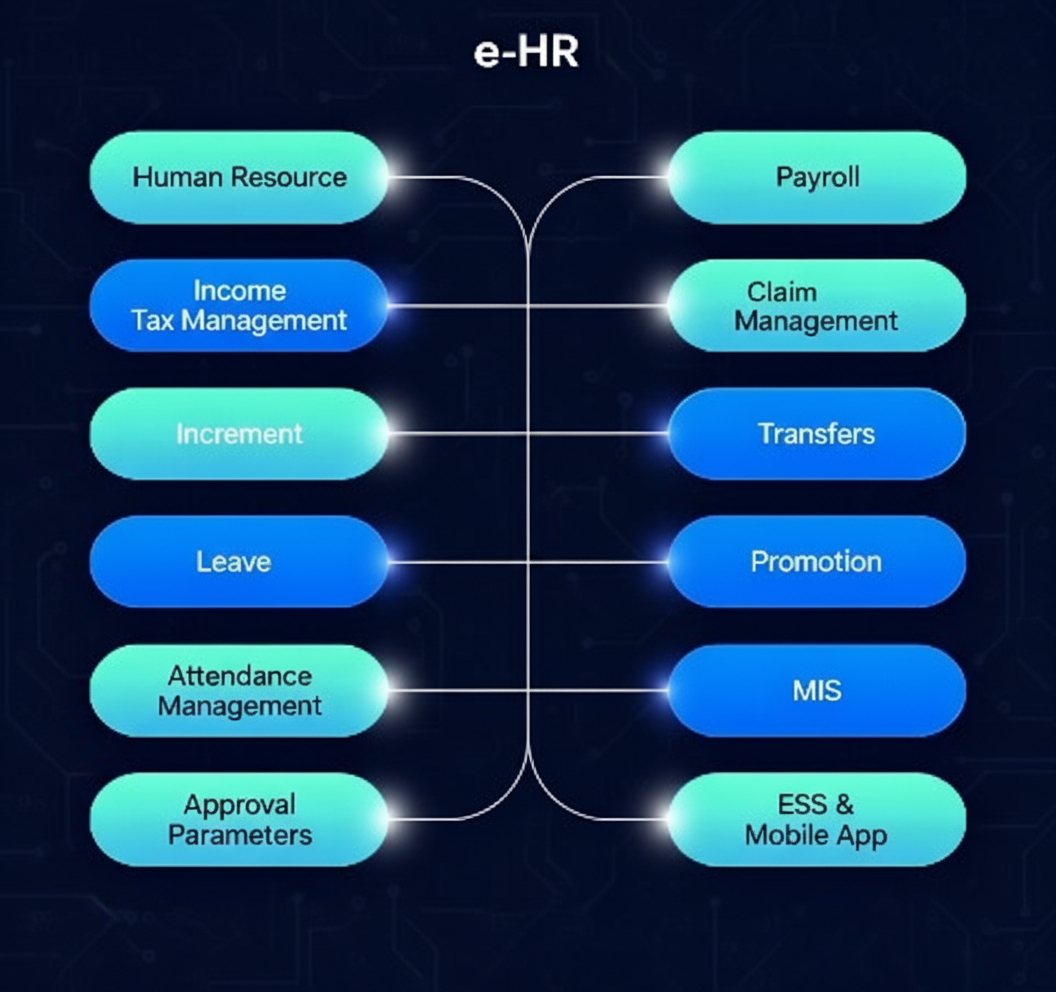
  • e-HR is a comprehensive digital platform that automates all HR processes, including payroll, leave, attendance, claims, and employee records.

  • It enables seamless management of manpower planning, transfers, promotions, and performance appraisals, while integrating with biometric and other devices.

  • With online applications, approvals, and detailed reporting, e-HR ensures efficient, paperless, and transparent human resource management across the organization.

Customer Goals and Our Solution

Customer Goals :

Customer Goals

  • Core HR Functionality
  • Org. Structure
  • Employee Data
  • User Management
  • Payroll Management
  • Increment Management
  • Transfer Management
  • Promotion Management
  • Income Tax Management
  • Loan Management
  • Exit Management
  • DAC/Suspension Management
  • Employee Self-Service (ESS) Portal
  • Mobile App
  • Leave & Attendance Management
  • Probation and Confirmation Process
  • Compassionate Grounds Appointment
  • Asset / Liabilities Declaration
  • Training Management
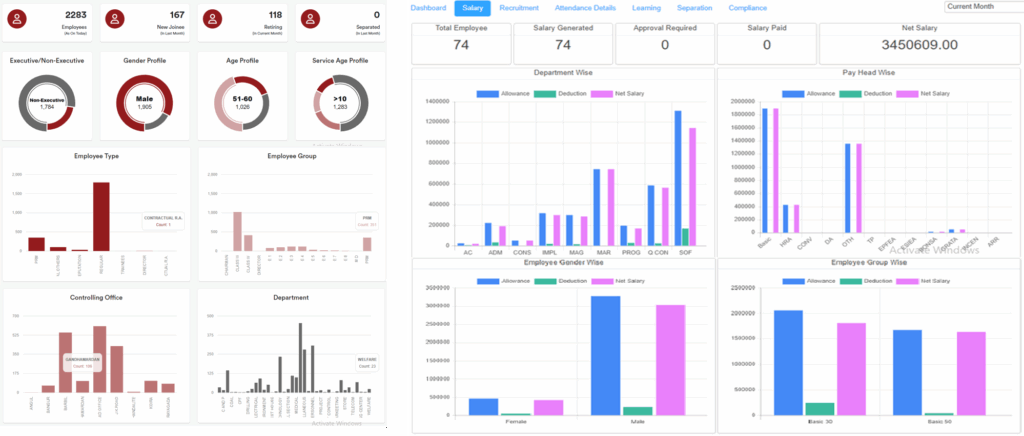
  • Dashboards, Reports & Statements

Our Solution :

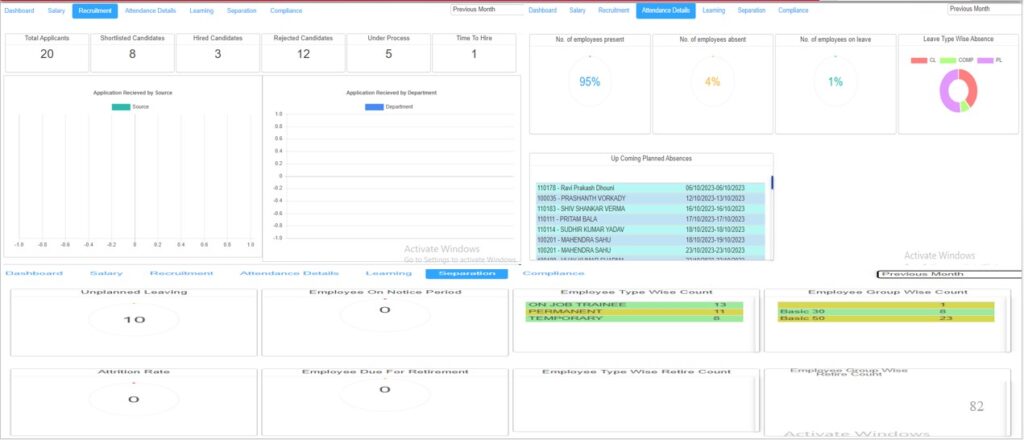
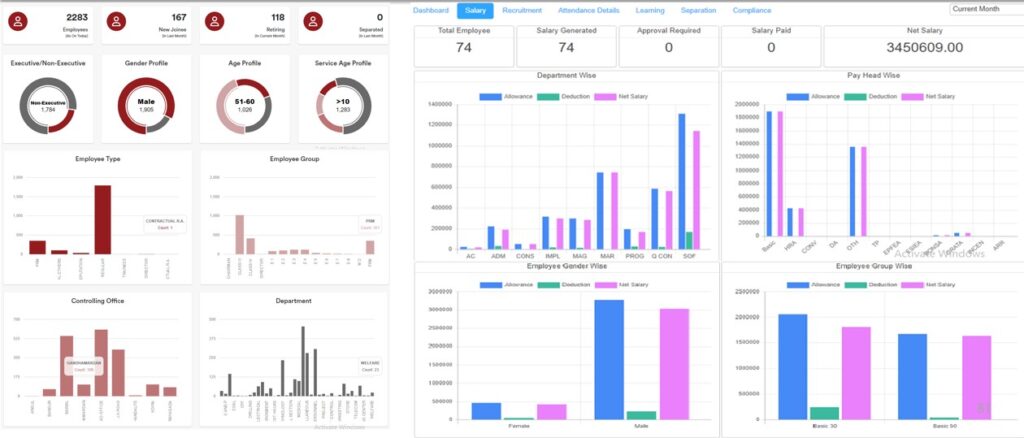
Dashboard

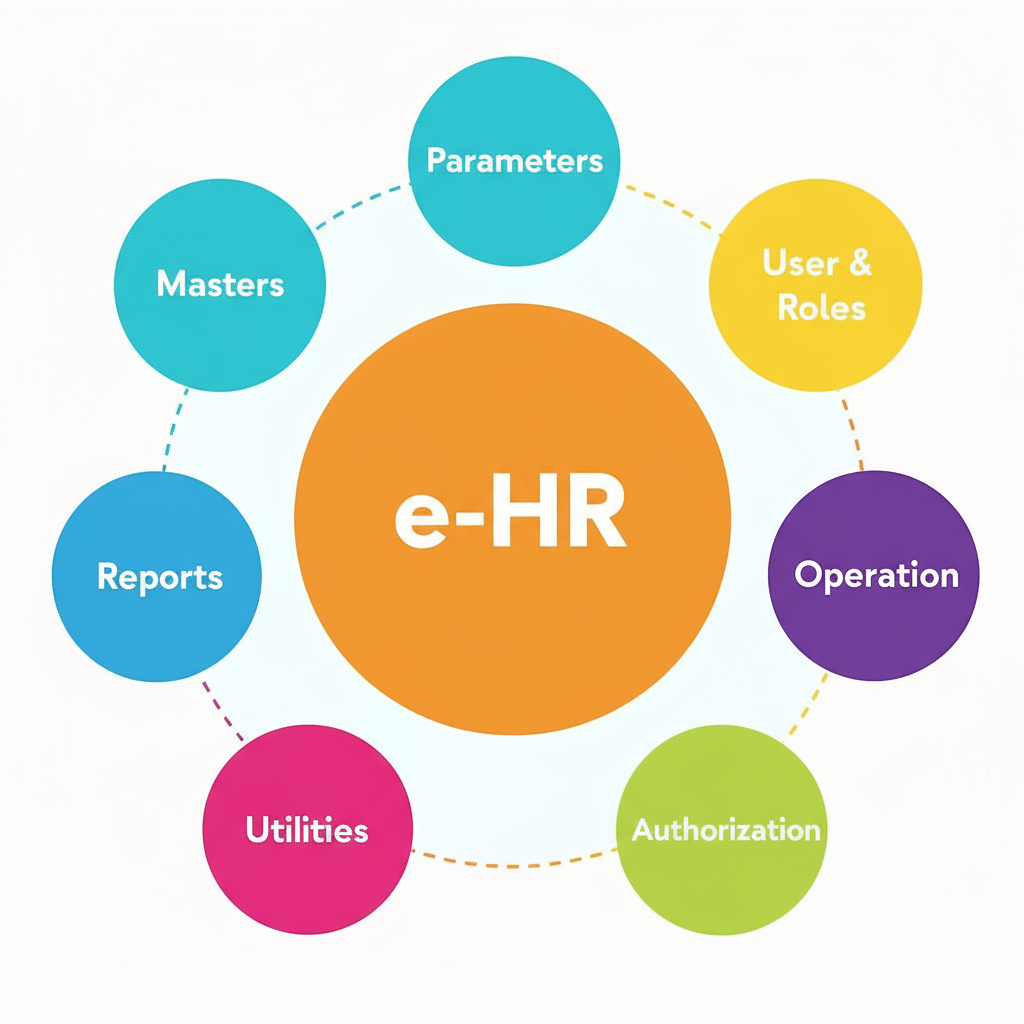
Software Structure

Module wise bifurcation, access rights to be given for the specific use. It’s one time activity and it’s make further easy to use of the application.

  • Masters – One time activity and it’s use whole the application for ease to use.
  • Parameters – One time activity and it’s use whole the application for ease to use.
  • User & Roles – Create role wise user and provide access right on the role.
  • Operation – Only users who have been granted access can perform this action.
  • Authorization – Only users who have been granted access can perform this action.
  • Utilities – Only users who have been granted access can perform this action.
  • Reports – Only users who have been granted access can view, download the report.

Manpower Planning

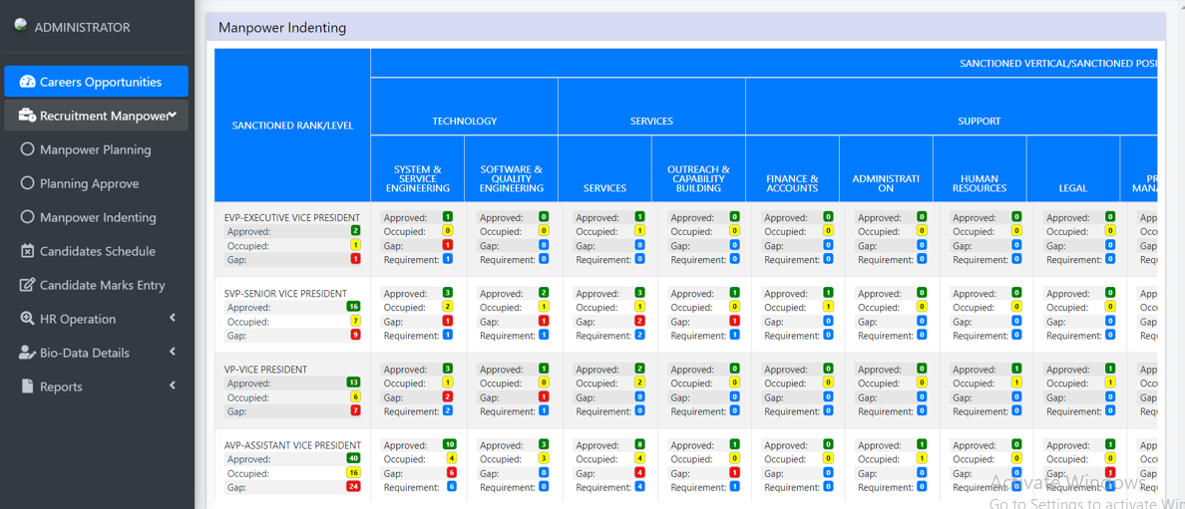
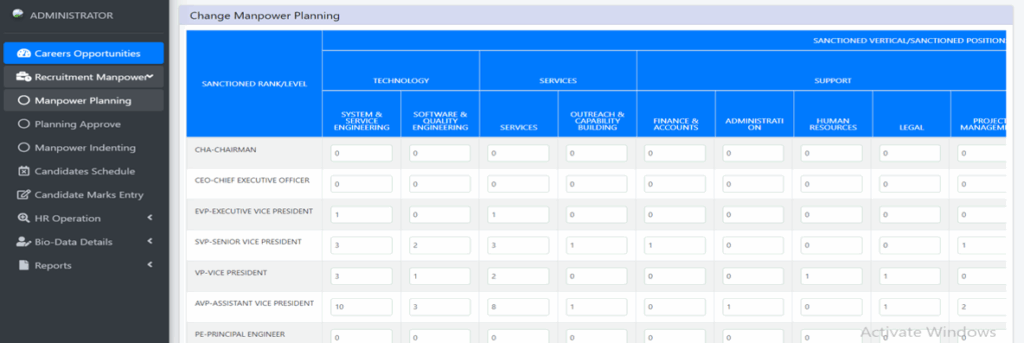
Our Manpower Planning Module helps organizations analyze current manpower inventory, track sanctioned positions, and manage workforce efficiently.

Inventory Screen Features:

  1. Sanctioned Rank/Level: Displays the designation hierarchy.

  2. Sanctioned Vertical: Shows the parent department structure.

  3. Sanctioned Position: Lists positions within child departments.

  4. Child Department & Designation Details: Provides a detailed view of each child department and its designations.

Manpower Position Tracking:

  • Track current manpower distribution across departments and designations.

  • Monitor vacancies and ensure alignment with organizational structure.

Manpower Planning Approval:

  1. Sanctioned Rank/Level: Verify the designation hierarchy.

  2. Sanctioned Vertical: Review parent department allocations.

  3. Sanctioned Position: Examine child department positions.

  4. Current Sanction: Display existing manpower in each position.

  5. Proposed Changes: Capture planned changes in manpower.

  6. Change By User: Record the user responsible for modifications, including name and code.


The Manpower Planning Module enables strategic workforce management, facilitates approvals, and ensures transparency in manpower allocation and changes.

For each Child Department, the system provides detailed manpower information, including Approved, Occupied, Gap, and Requirement metrics:

  • Approved: Total sanctioned manpower for the department and designation.

  • Occupied: Number of employees currently working in the department and designation.

    • Click on Occupied to view the list of working and non-working employees.

    • If no employees are occupied, a message is displayed and no list is shown.

  • Gap: Difference between approved and occupied positions (Approved − Occupied).

    • Click on Gap to view the corresponding employee lists.

    • If the occupied count is zero, a message is displayed and no list is shown.

  • Requirement: Total number of employees required, calculated as Approved − Occupied.


This module ensures transparent manpower tracking, highlighting areas with staffing shortages and helping plan for recruitment or redeployment efficiently.

Recruitment Management System

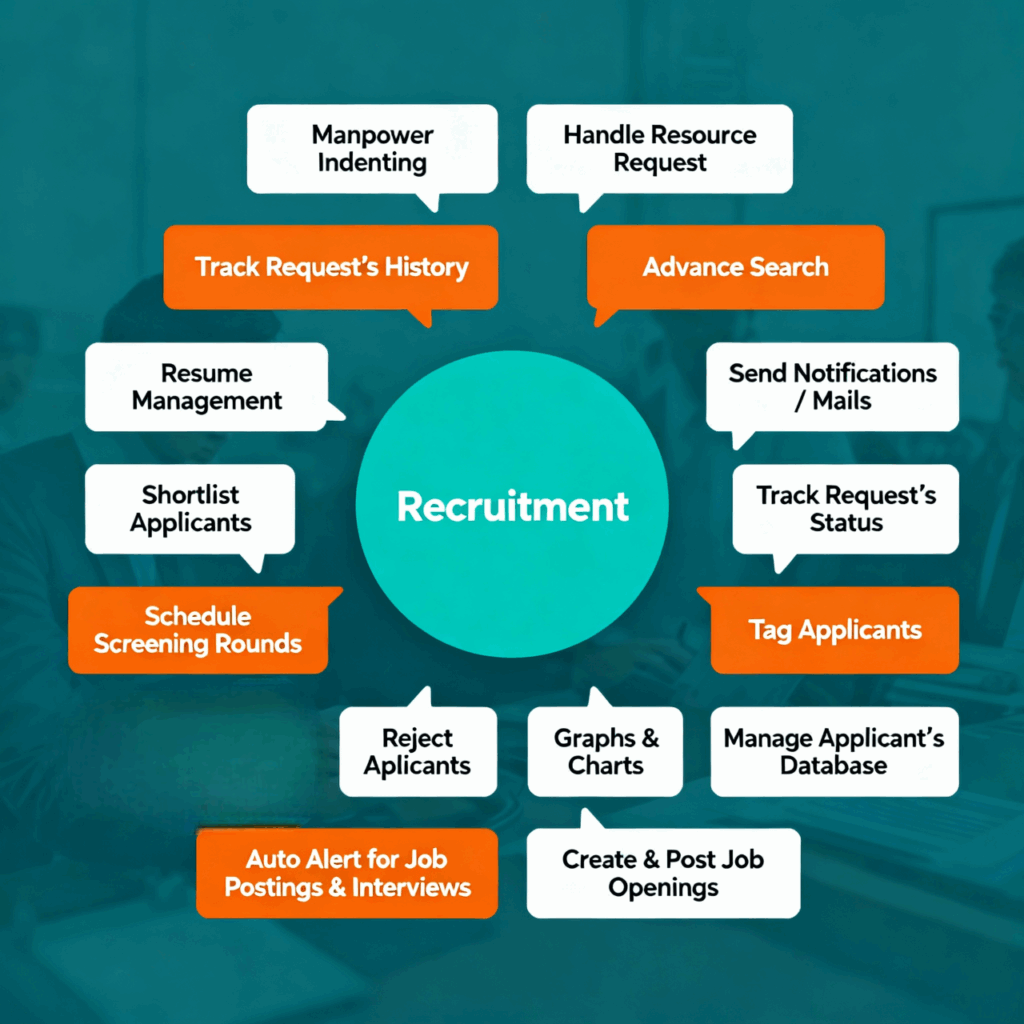
Our Recruitment Management System provides a complete, end-to-end solution for managing the entire recruitment lifecycle—from requirement generation to employee onboarding. The system ensures a streamlined, automated process aligned with organizational policies and role-specific parameters.

Key Features:

  • Complete Recruitment Lifecycle: Automates all recruitment steps, including requirement generation, job posting, candidate screening, selection, and joining.

  • Dashboard: Real-time overview of open and filled positions for efficient tracking.

  • Recruiter Agency Integration: Seamless linking with external job portals and professional networks like LinkedIn, Naukri.com, and more.

  • Job Posting: Post vacancies directly on the company website or external portals.

  • Role-Based Recruitment: Manage recruitment for different categories—Officers, Specialist Officers, Clerks, Subordinates, etc.

  • Special Recruitment Provisions:

    • Reserved categories (SC/ST/OBC/Physically Challenged) with eligibility relaxations.

    • Compassionate recruitment.

    • Recruitment for special categories such as sportspersons and physically handicapped candidates.

  • Applicant Management: Capture detailed candidate information, maintain resumes, and track application history.

  • Tests and Assessments:

    • Create and manage multiple types of tests.

    • Maintain a question/answer repository.

    • Conduct and evaluate tests/interviews online.

  • Resume Shortlisting: Smart resume parsing and keyword-based shortlisting for faster screening.

  • Configurable Screening Questionnaires: Tailor pre-interview questionnaires according to job requirements.

  • Interview Scheduling: Organize interviews and assessments efficiently within the system.

  • Hiring Approvals & Onboarding: Approvals workflow integrated with the Personnel Information Management (PIM) system for smooth employee onboarding.

  • Notifications: Automated email notifications for candidates, interviewers, and HR personnel.

With our Recruitment Management System, organizations can achieve faster hiring, transparent processes, and a structured approach to talent acquisition.

Candidate Management & Scheduling

Our Candidate Management Module provides end-to-end support for recruitment, from bio-data management to interview scheduling and communication:

Bio-Data Management

  • Maintain and edit candidate bio-data by Recruiter Agency and Recruiter Manager.

  • Capture candidate documents through Document Upload, either by the Candidate or HR.

  • Maintain a repository of all candidate records for efficient tracking.

Shortlisting Candidates

  • Filter candidates based on Name, Age Group, Experience, Education, and other criteria.

  • Select shortlisted candidates using checkboxes.

  • Automated email notifications sent to Candidate, Recruiter Manager, and Agency upon shortlisting.

Interview & Exam Scheduling

  • Schedule candidates according to the selected job description and recruitment process flow.

  • View Already Scheduled and Not Scheduled candidates for easy management.

  • Edit scheduling anytime as required.

  • Specify type of interaction: Telephonic, Online, or Face-to-Face, with location details if applicable.

  • Select Examiner/Interviewer from a predefined list of users with the Interviewer role.

  • Enter Interview/Exam Date: Only current or future dates allowed.

  • Enter Time: Must be validated to ensure proper scheduling; system will prompt if invalid.

  • Automated email notifications sent to Candidate, Recruiter Manager, Agency, and Interviewer upon scheduling.

This module ensures streamlined recruitment operations, transparent scheduling, and timely communication for all stakeholders.

Pre-Boarding

  • Automatic transfer of applicant details into the employee database for confirmed joiners.

  • Alerts for laptop, equipment, and work desk allocation.

  • Setup of Induction Training schedules for new hires.

  • Alerts and reminders sent before the date of joining to relevant stakeholders.

Onboarding

  • Induction Training session scheduling and management.

  • Welcome email sent to the new hire.

  • Automated alerts and notifications for the new employee.

  • Uploading of joining documents by the new hire or HR.

  • Upload of onboarding presentations and training materials.

Human Resources Inventory UI/UX

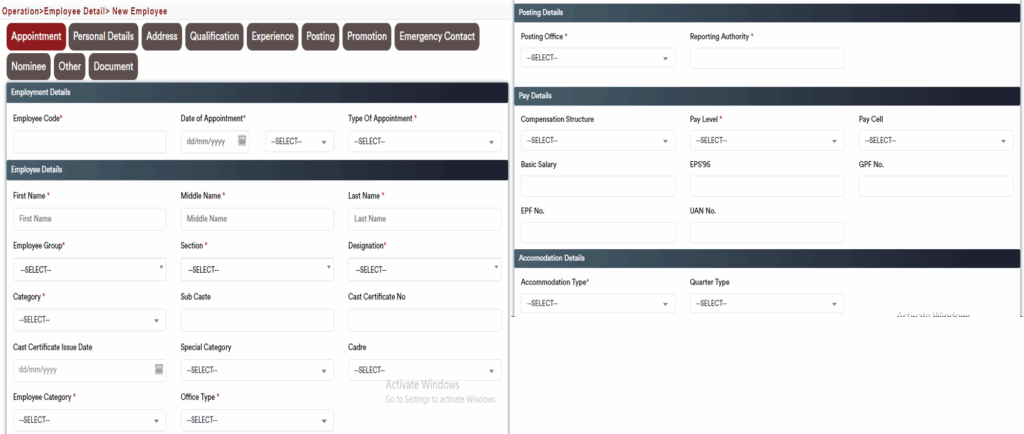
A comprehensive and centralized module designed to capture, manage, and maintain complete employee information across their entire lifecycle — from recruitment to retirement. The interface ensures structured data collection, streamlined workflows, and seamless integration with other HR modules.

1. Joining & Employment Details

  • Record and manage Effective Date, Employee Code, Date of Appointment, and Type of Appointment.

  • Capture Initial Designation, employment type, and key onboarding details.

  • Maintain a complete employment history to support payroll, promotion, and compliance processes.


2. Employee Information

  • Capture personal details including First Name, Middle Name, Last Name, Category, and Employee Group.

  • Record Department/Wing, Designation, Post Held Date, and Caste Certificate information.

  • Maintain Special Category, Cadre, Employee Category, Work Type, and Increment History.

  • Ensure all key employment and demographic information is easily accessible.

3. Posting & Organizational Details

  • Manage Posting Office, Salary Office, Claim Office, Budget Office, and Establishment Office.

  • Define reporting hierarchy by assigning Reporting Managers and Reviewing Officers.

  • Ensure accurate mapping to organizational structures for seamless workflow and reporting.


4. Pay & Service Details

  • Record Pay Level, Pay Scale, and relevant identifiers like PFMS No., PRAN, GPF/EPF, and UAN.

  • Manage Accommodation Type, Probation/Contract Period, Confirmation Dates, and Nature of Appointment.

  • Capture declarations such as Political Affiliation, Police/Criminal Record, and Fuel & Vehicle Eligibility.

  • Maintain all service-related records to support payroll, compliance, and audit.

5. Personal Details

  • Capture Full Name, Photograph, Signature, Date of Birth, Gender, and Parental Information.

  • Store Multiple Addresses (permanent, present, posting, and hometown) to support HRA and LTC processing.

  • Record Contact Details, Blood Group, Religion/Caste, Marital Status, and Language Proficiency.

Maintain national identification records, educational qualifications, and work experience details.

6. Family & Dependent Information

  • Maintain Dependent Data for benefits administration and compliance.
  • Record Nominee Details with percentage-level bifurcation for various schemes.
  • Store Property Details, Health Data, Passport & Visa Information, and Bank Account Details.
  • Capture Emergency Contacts, Volunteer Activities, and Hobbies for holistic employee profiling.

7. Verification & Documentation

  • Store Employee Photo, Signature, Fingerprints, and KYC Documents.

  • Record Driving License, National Identification, and other mandatory verification details.

  • Track Relatives working in the same organization for transparency and compliance.

  • Maintain a complete digital document repository for quick access and audit readiness.

Training / Learning and Development

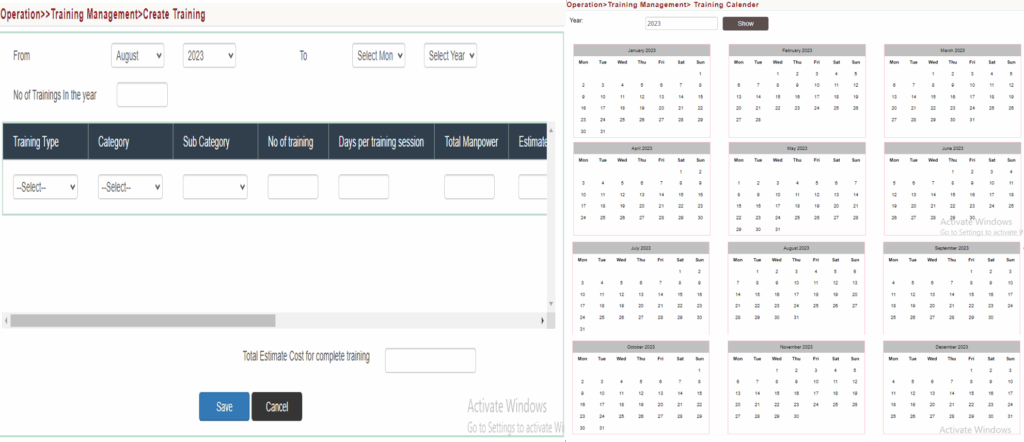
A comprehensive training management module designed to plan, deliver, track, and evaluate employee training programs effectively.

  • User-defined Training Courses and Categories for flexible curriculum design.

  • Creation of Annual Training Calendars with pre-defined schedules for each training year.

  • Ability to define Qualifying Skills, Qualifying Courses, and Disqualifying Courses for structured learning paths.

  • Support for both in-house and external training programs with complete scheduling and tracking.

  • Centralized management of Instructors, Training Facilities, Contract Bidders, and Required Equipment.

  • Self-Nomination Facility for employees with an approval workflow.

  • Managers can nominate subordinates for relevant training programs.

  • Built-in Training Need Analysis to align training with organizational goals.

  • Real-time Training Budget and Cost Dashboards for effective resource planning.

  • Pre-defined Training Schedules accessible online to all employees.

  • Attendance Tracking at both program and date level.

  • Configuration of Training Locations, Venues, Special Needs, and Training Expectations.

  • Multiple enrollment modes including Employee Enrollment, Manager Enrollment, and Training Needs from Appraisal Systems.

  • Provision to define and manage External Training Programs.

  • Ability to group courses into training programs and link them with specific job roles.

  • Automated Training Feedback Collection and Reports Generation for continuous improvement.

Training / Learning and Development UI/UX

Appraisal & Performance

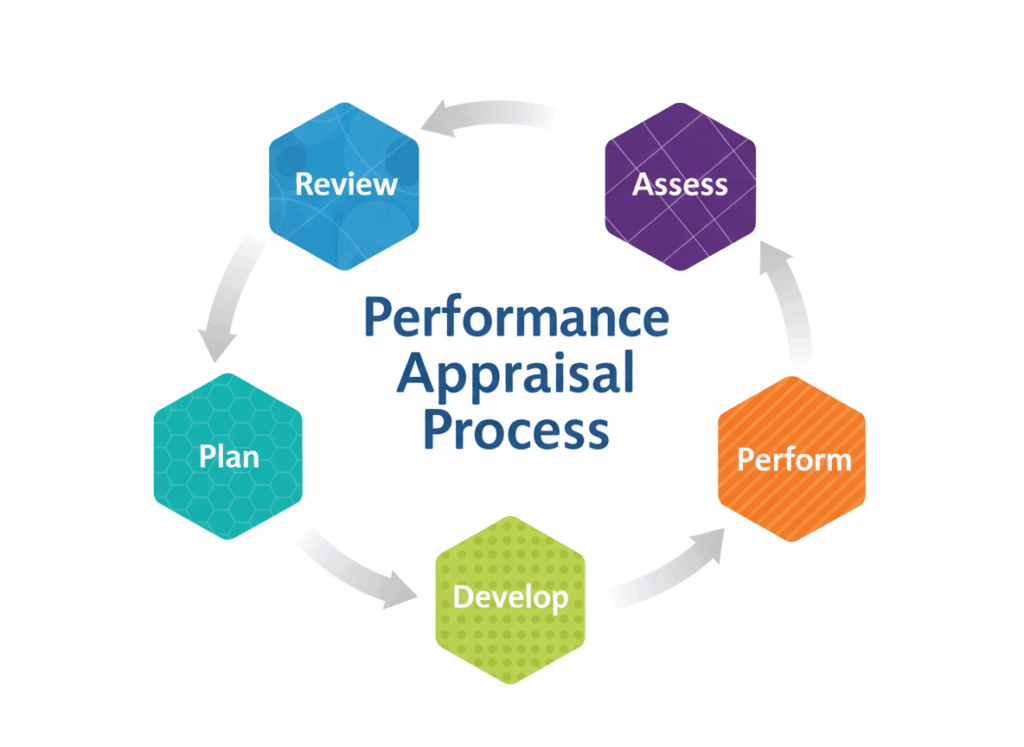
A comprehensive Appraisal Module designed to automate the entire performance review cycle — from goal setting to appraisal results, rating normalization, and increment release — ensuring transparency, consistency, and efficiency.

1. Goal Setting & Alignment

  • Define Company Objectives, KPI Initiatives, and Goal/KRA structures aligned with organizational strategy.

  • Derive individual goals from company initiatives to ensure alignment with business outcomes.

  • Allocate goal sheets to employees with configurable workflows between managers and employees.

  • Enable goal sheet approval from both employee and manager to finalize objectives.

  • Employees can update goal progress regularly, with real-time visibility to their managers.

2. Continuous Feedback & Review

  • Built-in continuous feedback mechanism for employees and managers.

  • Mid-Year Reviews and interim evaluations supported.

  • Goal progress updates include ratings, comments, and action plans.

  • Configurable review templates and structured communication flows.


3. Appraisal Cycle & Evaluation

  • Appraisal announcements and guidelines automatically sent to employees via email and visible on the platform.

  • Managers can review and rate employees based on goal achievements.

  • User-defined KRA, competency, and QA forms can be assigned at appraisal time.

  • Allow manager and dotted manager inputs with comments and notes.

  • Supports 360° appraisal — Managers, Subordinates, Peers, Customers, and Vendors can provide ratings based on defined parameters.

  • Competency mapping workflows ensure structured evaluations.

4. Scoring & Normalization

  • Parameter-wise rating, final ratings, and feedback captured systematically.

  • Weighted scoring model allows custom weightage per parameter.

  • Automatic calculation of total points and overall grade.

  • Normalization of scores to ensure fair and balanced evaluations across teams.

  • Capture strengths, weaknesses, and improvement suggestions by appraising/reviewing authorities.


5. Appraisal Results & Increments

  • Appraisal results seamlessly integrated with promotion and increment processes.

  • Competency-wise and parameter-wise performance tracking for each cadre/grade.

  • Automatic increment calculation and release, linked with the payroll module.

  • Supports qualification-based increments and monthly or period-based increment processing.

  • Allows generation of reminder letters/mails for pending self-appraisals.

  • Memo notifications triggered for unsatisfactory performance.

  • Complete history of performance appraisals maintained for reference and audit.

UI/UX navigation

Employee Appraisal

A structured and automated module designed to plan, execute, and manage the entire performance appraisal cycle — ensuring transparency, timely reviews, and alignment with organizational goals.


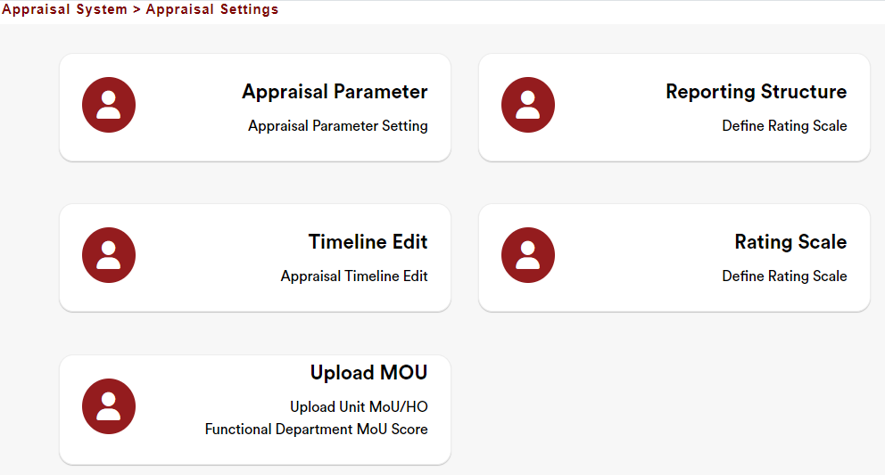
1. Appraisal Configuration & Setup

  • Appraisal Settings: Define and configure appraisal cycles and timelines.

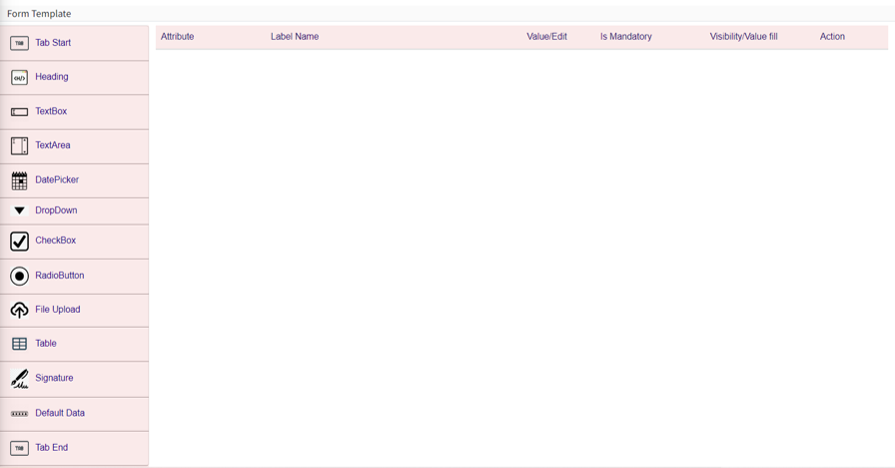
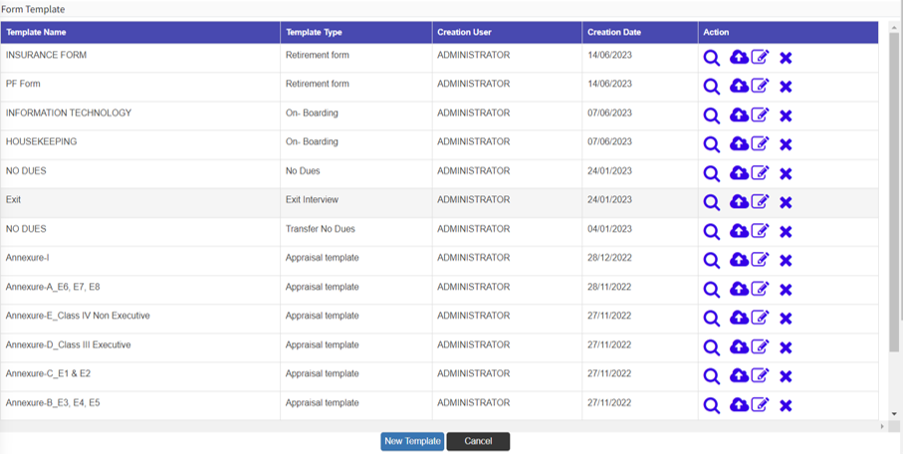
  • Template Creation: Create and manage appraisal templates aligned with organizational goals and competencies.

  • Appraisal Parameters: Define rating parameters, evaluation criteria, and competency models.

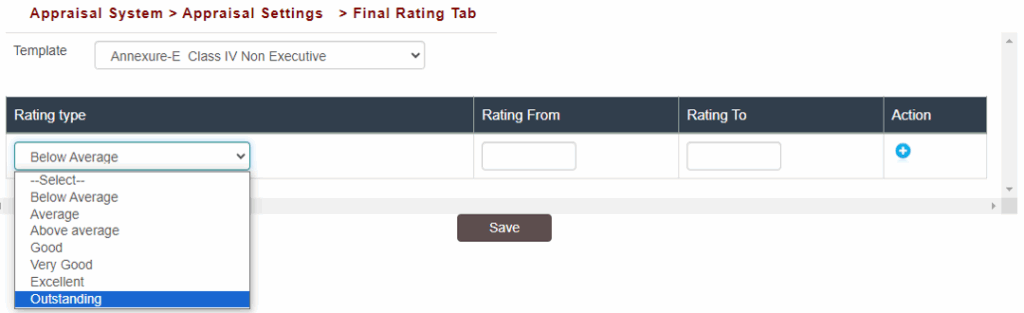
  • Appraisal Scale: Configure scale definitions for ratings and weightage distribution.

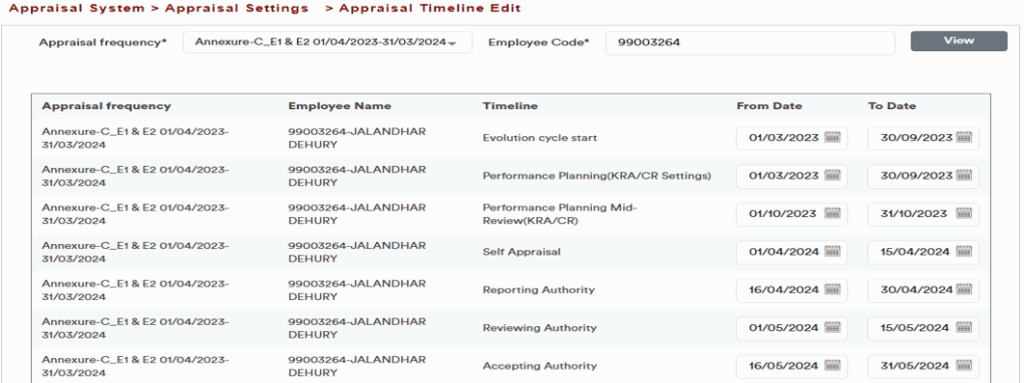
  • Appraisal Timeline: Set start and end dates for each stage of the appraisal process.

2. Appraisal Cycle Timeline

  • Evaluation Cycle: Define start and end dates for the entire appraisal process.

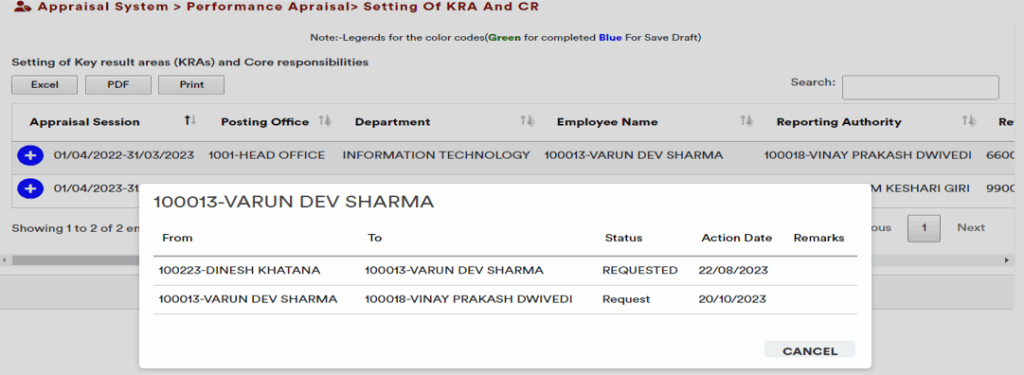
  • Performance Planning (KRA/CR): Establish and assign goals/KRAs within a specific timeline.

  • Mid-Year Review: Facilitate progress review and updates on KRAs.

  • Self-Appraisal: Employees submit their self-assessment within the defined period.

  • Reporting Authority Review: Manager evaluates employee performance based on achievements.

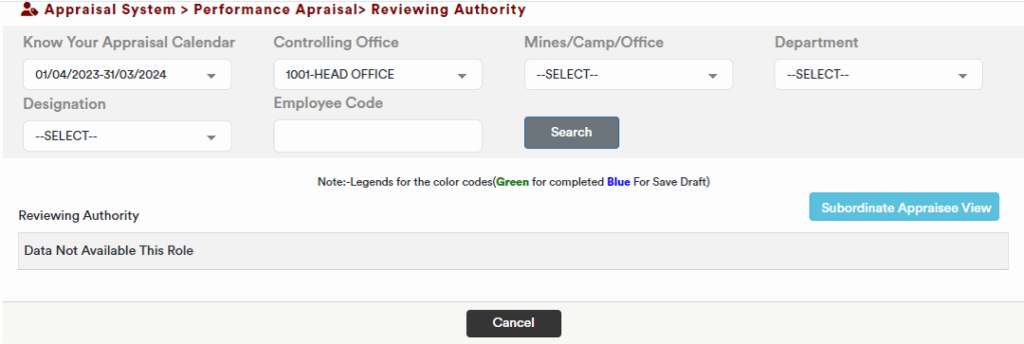
  • Reviewing Authority Review: Secondary validation of performance and scores.

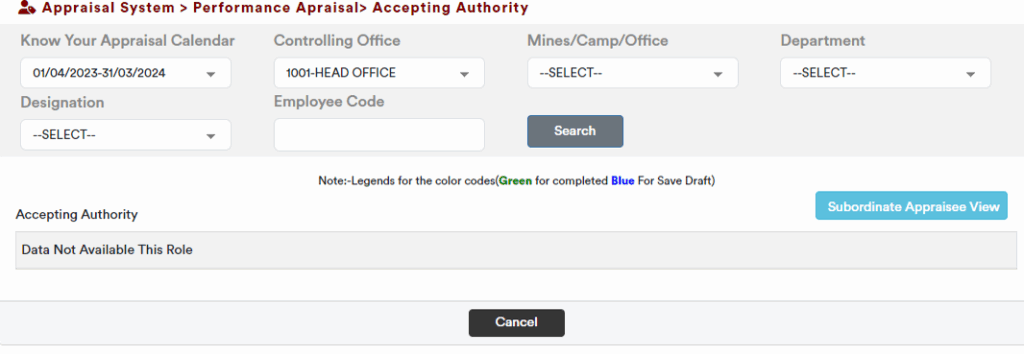
  • Accepting Authority Approval: Final acceptance and validation of appraisal ratings.

  • Representation (Revised Score Appeal): Employees can submit appeals for revised scores within defined dates.

3. Appraisal Process Workflow

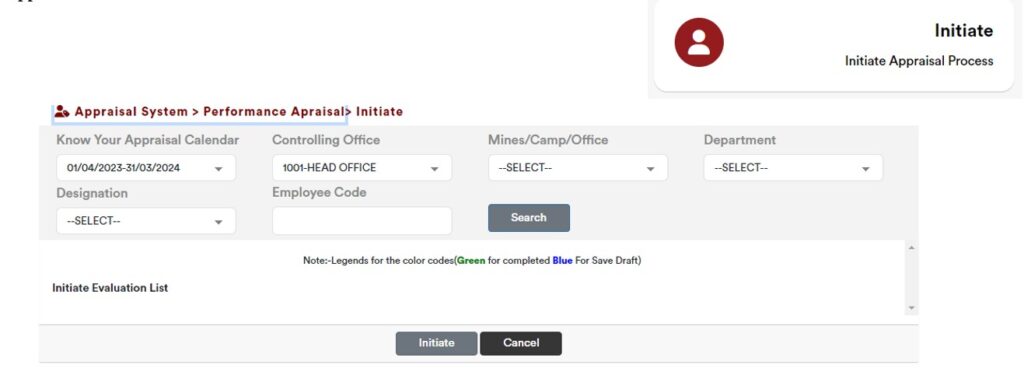
  1. Appraisal Initiation – System triggers the start of the evaluation cycle.

  2. KRA Submission – KRAs are submitted by the Employee or Reporting Manager.

  3. Self-Appraisal – Employees complete their self-assessment.

  4. Reporting Authority Evaluation – First-level review and rating.

  5. Reviewing Authority Evaluation – Second-level review and approval.

  6. Accepting Authority Validation – Final validation and closure.

  7. Representation (Revised Score Appeal) – Optional stage for employees to appeal their scores.


4. Additional Functionalities

  • Reporting Structure: Pre-defined reporting hierarchy ensures accurate workflow routing.

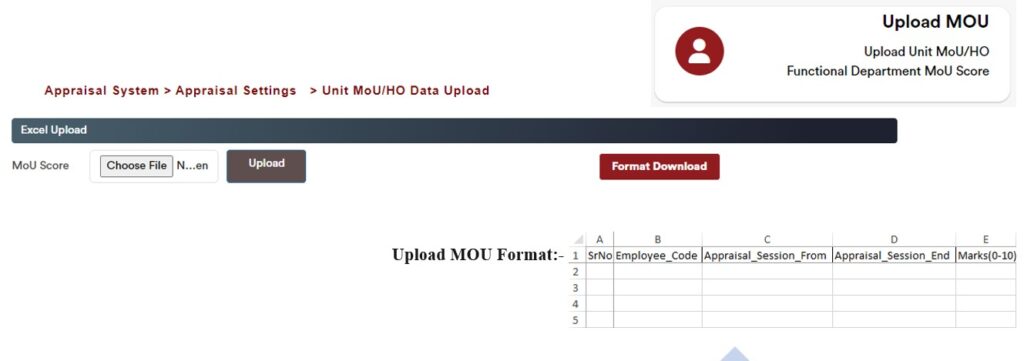
  • MOU Upload: Provision to upload Memorandum of Understanding (MOU) or goal-setting documents.

  • Configurable Timelines: Flexible date configurations for each appraisal stage.

  • Integrated Notifications: Automated alerts and reminders to employees and managers at every stage.

  • Audit Trail: Complete history of actions and score changes maintained for reference and compliance.

Appraisal Template Creation (Form Designer)

Appraisal Scale Parameter

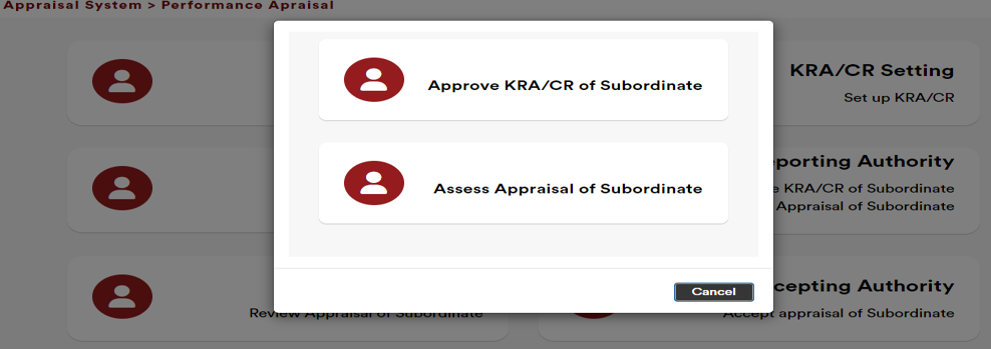
Reporting Flow:-

Appraisal & Performance - Dashboard

KRA Submission (Employee)

KRA Submission (Reporting Manager)

Reviewing Authority

Accepting Authority

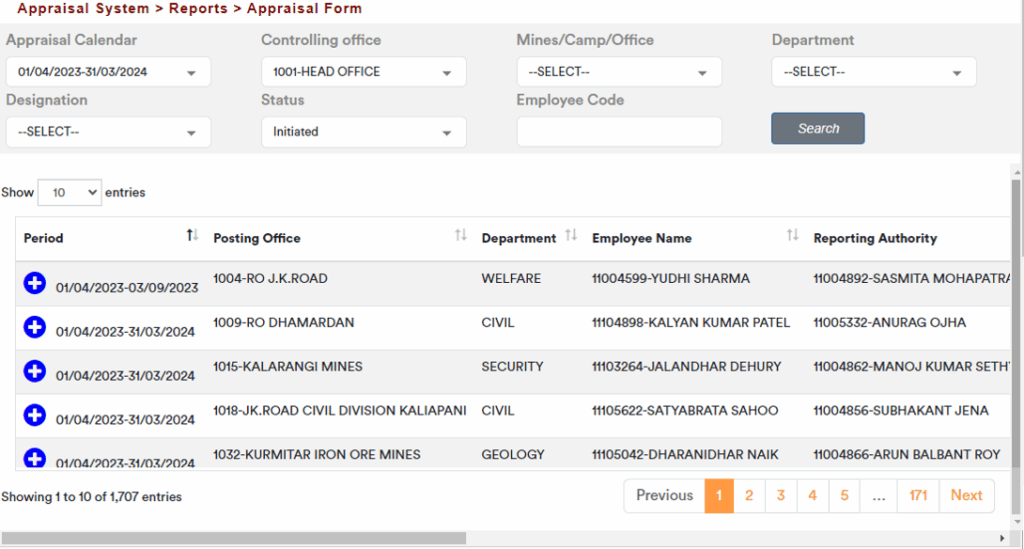
Reports :-

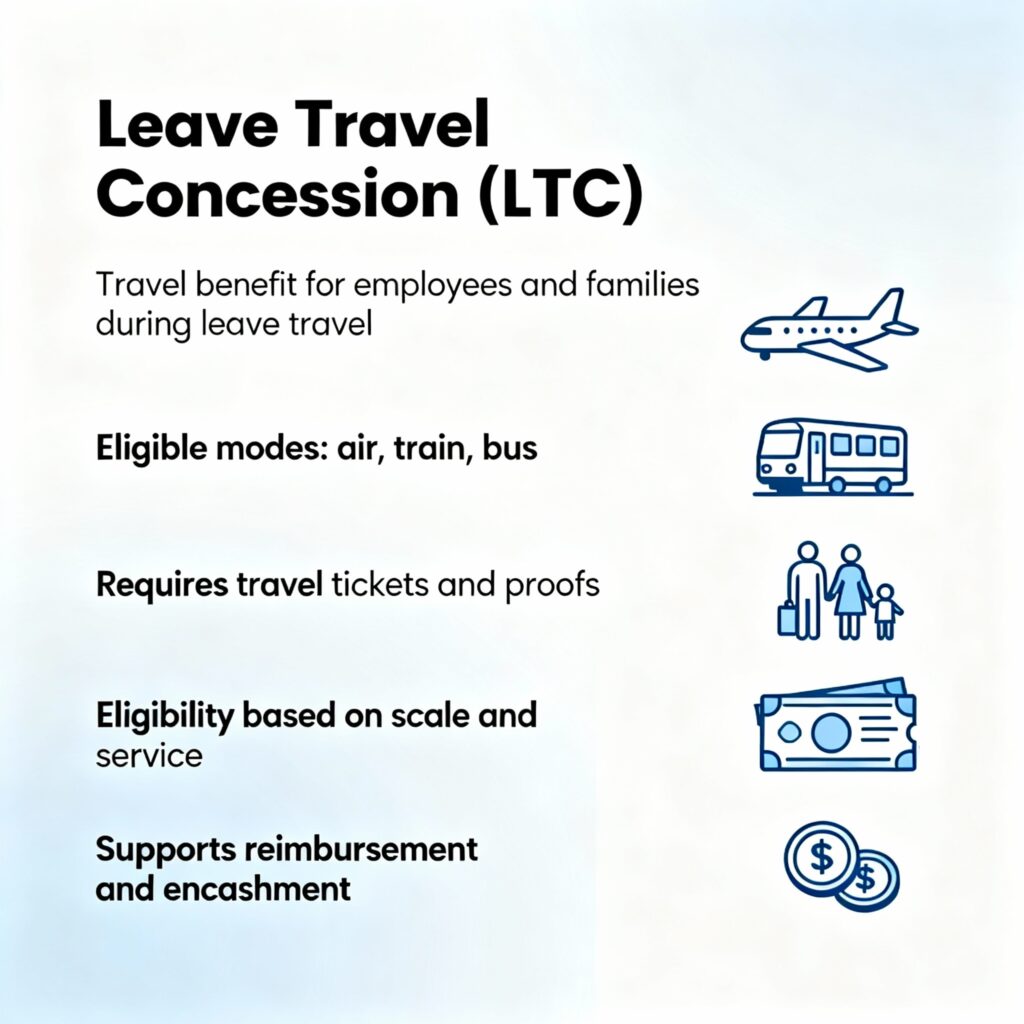
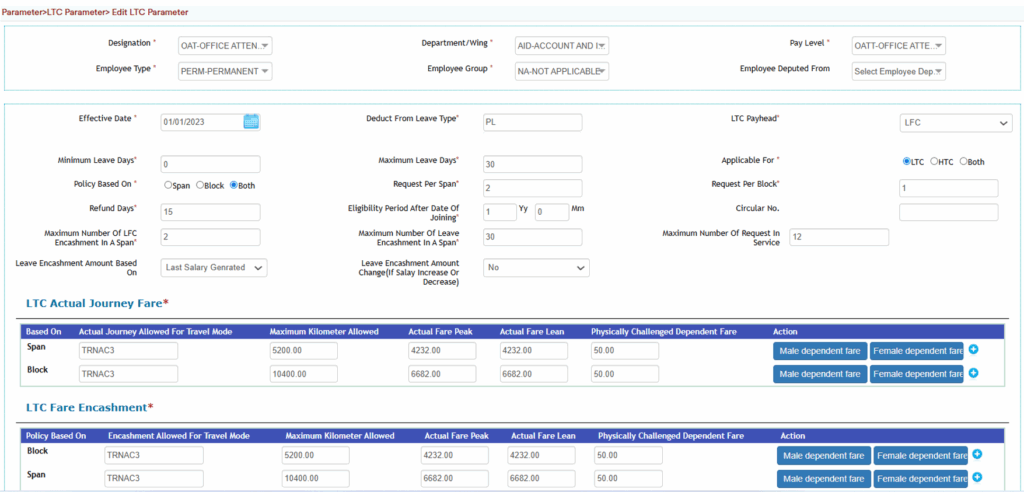
LTC/LFC Parameter

  • Support for multiple types of LFC based on employee scales and eligibility criteria.

  • Comprehensive LFC Register to track all LFC transactions and entitlements.

  • Provision to maintain all categories of LFC, ensuring flexibility and compliance.

  • Ability to define and manage LFC rules, including:

    • Availment and encashment rules

    • PL (Privilege Leave) encashment policies

    • LFC lapsing timelines and accumulation ceilings

    • Combination rules for LFC with PL encashment

  • Facility to record actual LFC availed by employees.

  • Real-time LFC balance computation at any point in time.

  • Integration of LFC data with employee service history for accurate tracking.

  • Accounting provisions including automatic crediting of LFC, and options for manual credit, modification, or cancellation.

  • LFC availment process aligned with statutory and organizational policies.

  • End-to-end online application and approval workflow for LFC.

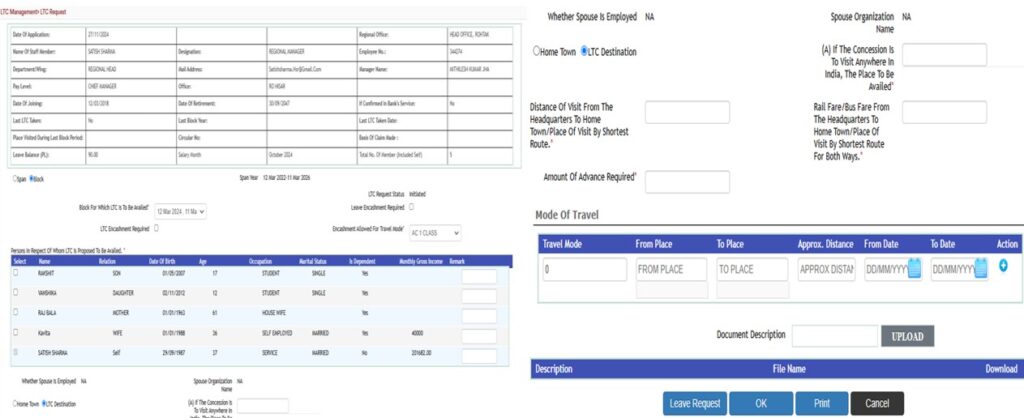
LTC/LFC Request

  • Online application and approval of LTC/LFC requests.

  • Support for multiple types of LTC/LFC based on employee scale and eligibility.

  • Automated validation of eligibility, balance, and applicable rules.

  • Facility to attach supporting documents and travel details.

  • Seamless integration with employee service history and payroll.

  • Real-time tracking of request status and notifications.

  • Provision for encashment and combination with PL (Privilege Leave) as per policy.

  • Role-based workflow for review, approval, or rejection of requests.

  • Audit trail and reporting for compliance and transparency.

Promotion

  • Comprehensive system to manage all aspects of employee transfers and promotions, including joining against transfer or promotion.

  • Ability to create standard career paths and define competency and skill requirements for higher-level roles.

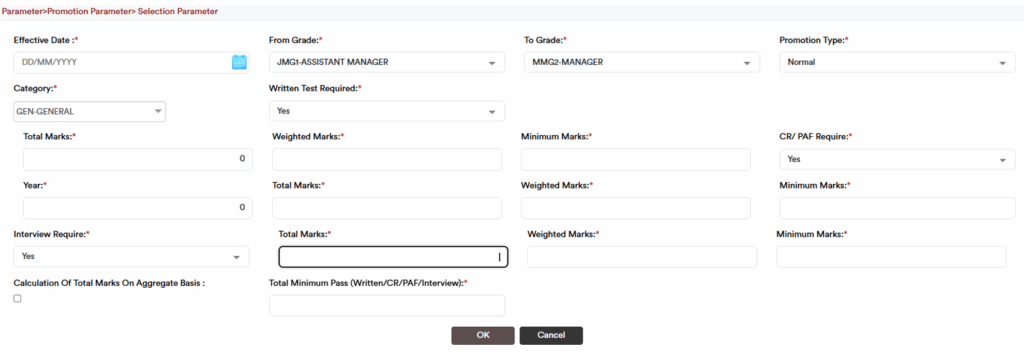
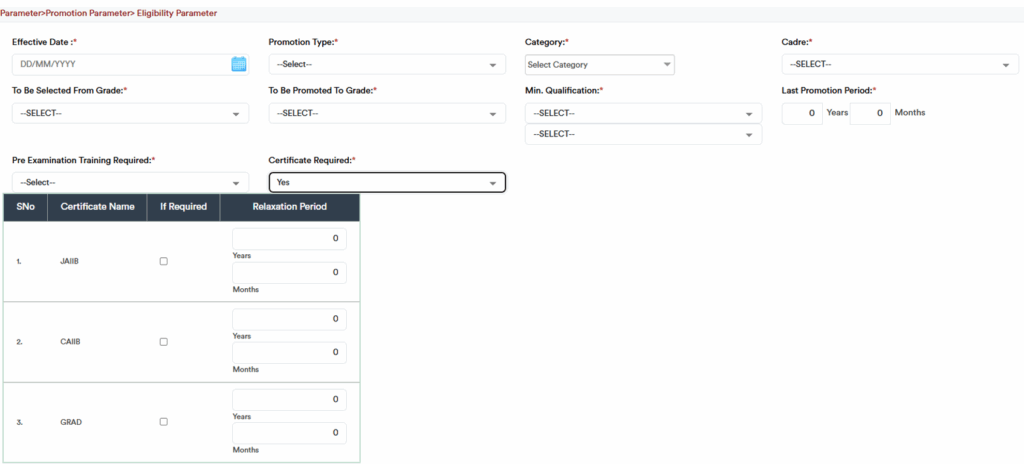
  • Define promotion eligibility rules based on tenure, performance ratings, and other organizational criteria.

  • Support for additional service-specific rules such as suspensions or disciplinary actions.

  • Automated identification of promotion-eligible employees based on predefined criteria.

  • Provision to conduct written tests, interviews, and evaluations as part of the promotion process.

  • Automated notifications of promotion or rejection via email, workflow, or letters.

  • Facility to generate offer letters for promotions and maintain a promotion waiting list.

  • Integration with training plans to identify development needs and strengths of employees.

  • Ability to define and track short- and long-term goals for employees, with a framework for progress monitoring.

  • Advanced vacancy planning for key positions, enabling proactive succession management.
Promotion Selection Parameter

Promotion Eligibility Parameter​

Leave management

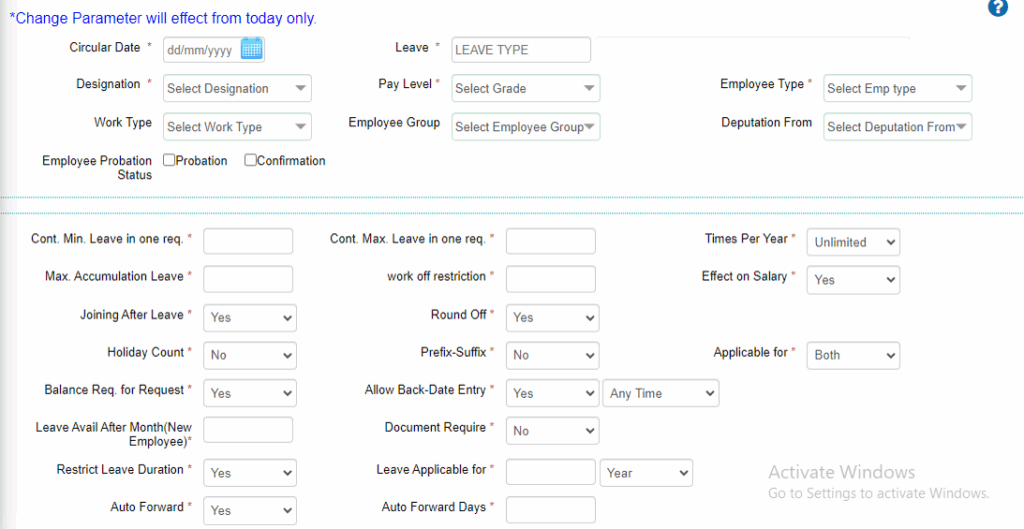
  • Flexible Leave Policy Configuration

    • Easy setup of leave policies with support for yearly, half-yearly, monthly, or pro-rata crediting.

    • Configurable leave calendars for multiple leave types.

    • Support for various leave types such as CL, PL etc.

  • Comprehensive Leave Rules

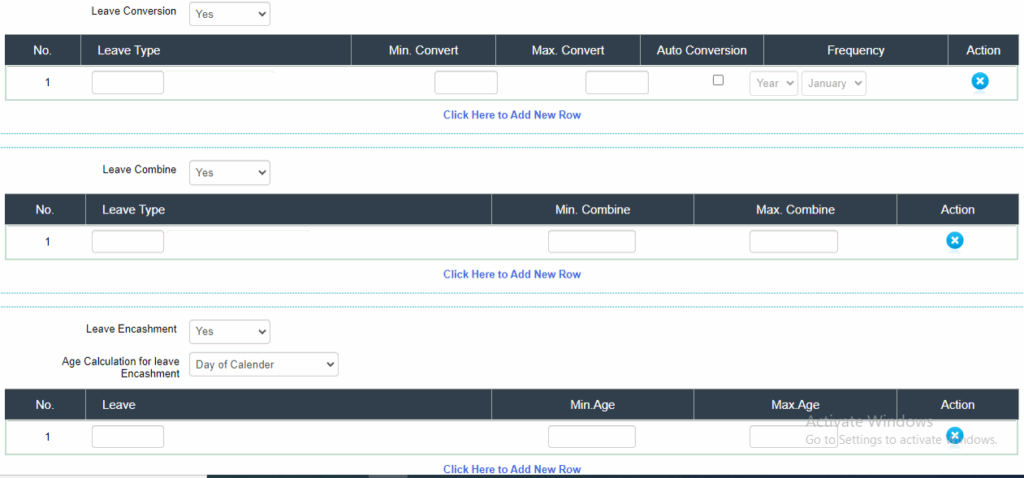
    • Define rules for leave accrual, availing, encashment, lapsing, and accumulation ceilings.

    • Support for leave combination rules and government-specific regularization workflows.

    • Ability to apply policies easily to multiple leave types.

  • Application & Approval Workflow

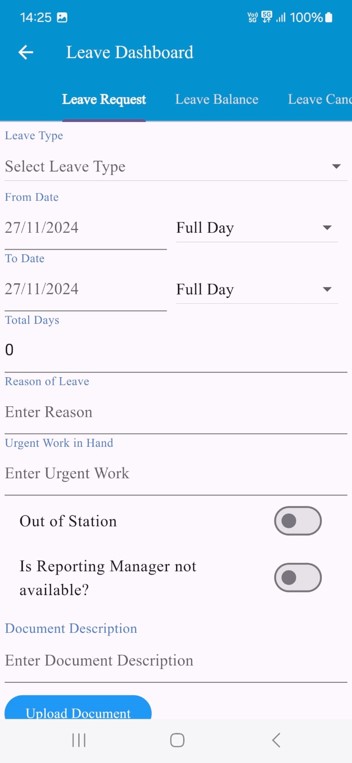
    • Online leave application and approval through Web and Mobile App.

    • Multi-level approval setup based on reporting hierarchy, department, and designation.

    • Separate workflows for leave encashment, exit processes, and different kinds of leave.

    • Auto email notifications for application, approval, and rejection events.

    • Option for auto-approval or auto-rejection based on predefined rules.

  • Dashboards & Reporting

    • HR and Admin dashboards to track application and approval status.

    • Department-wise, employee-wise, and mode-of-appointment-wise reports.

    • Real-time visibility of leave history to managers during approval.

    • Comprehensive leave registers and reports for audits and analysis.

Integration & Automation

  • Real-time leave balance calculation at any point in time.

  • Automatic crediting of leave with provisions for manual credit, debit, modification, or cancellation.

  • Auto-calculation of last working day in case of employee exit.

  • Seamless integration with payroll and employee history.

Additional Features

  • Application history tracking for employees and managers.

  • Notification and reminder workflows to ensure timely action.

  • Mobile-friendly interface for on-the-go leave management.
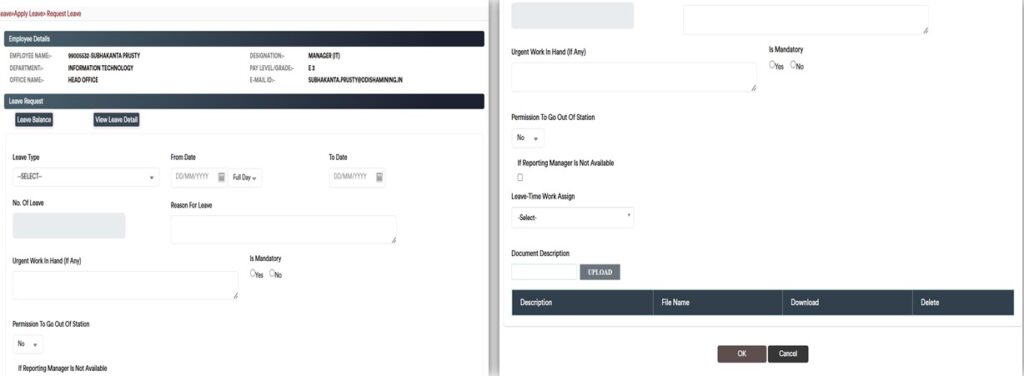
Leave Type wise parameter

eHR application having module wise lots of master and parameter, It’s make further easy to use of the application.

Leave Type wise leave application

Leave applications can be submitted and managed based on specific leave types, allowing employees and managers to track, approve, and report on individual leave categories such as CL, PL etc.

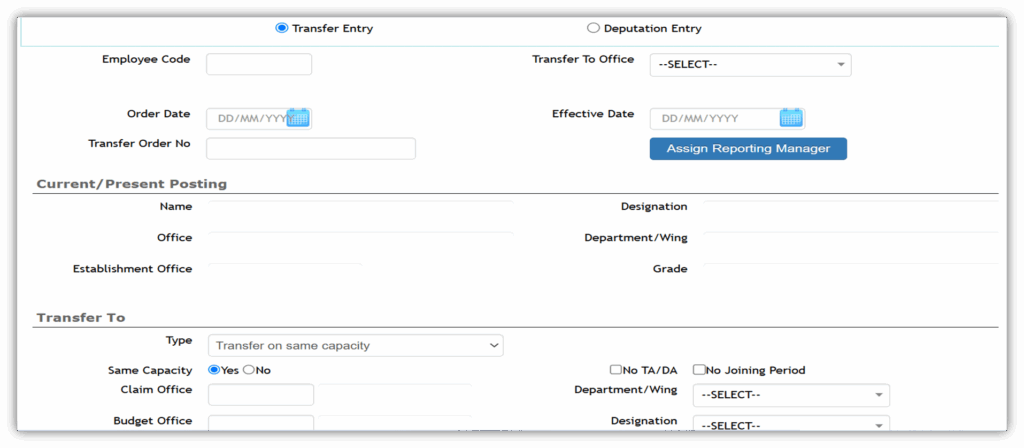
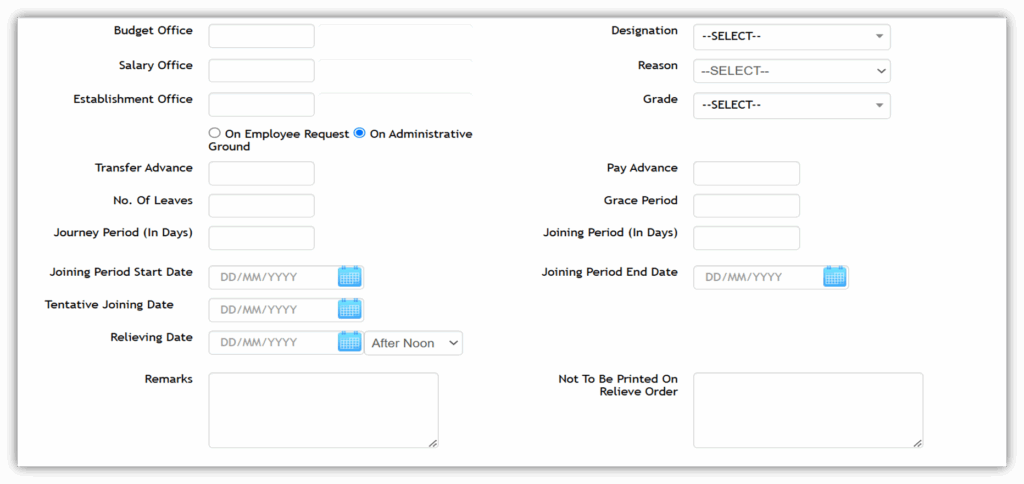
Transfer management

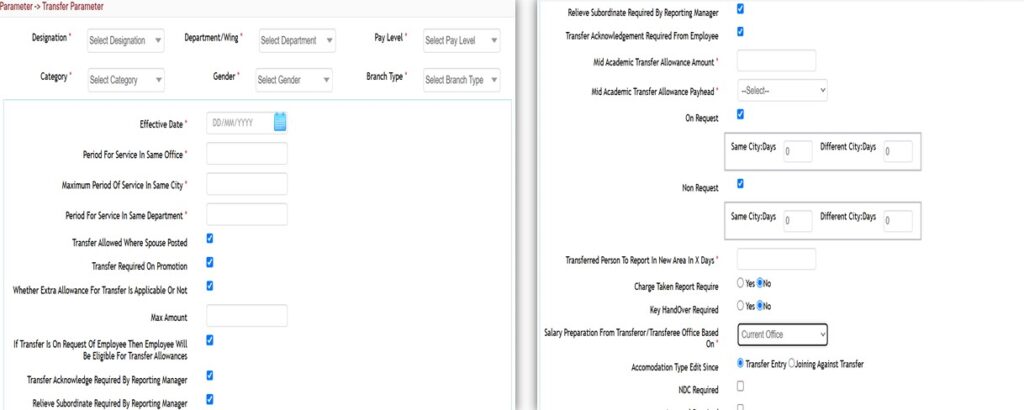
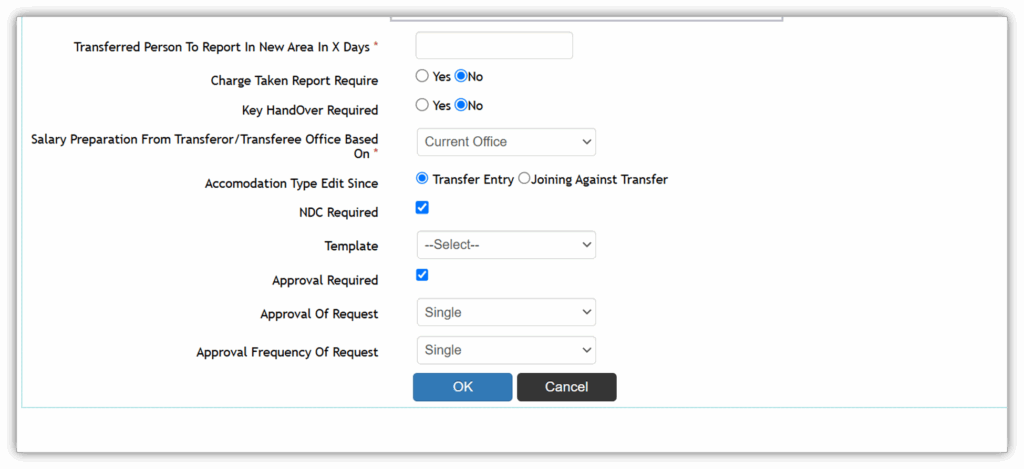
  • Automation of transfer processes with configurable rules and workflows.

  • Maintenance of complete employee transfer history.

  • Identification of vacancies and generation of transfer lists based on user-defined criteria.

  • Generation of eligible candidate lists for transfers.

  • Preparation of inter-seniority and seniority reports.

  • Posting/transfers of officers upon promotions.

  • Management of officers transferred out of the parent state and their return after completion of tenure.

  • Handling specialist transfers, including vacancy identification and recommendations from specialist departments.

  • Management of transfer exemptions.

  • Support for cancellation, deferment, or modification of transfer orders with follow-ups to regional/zonal offices.

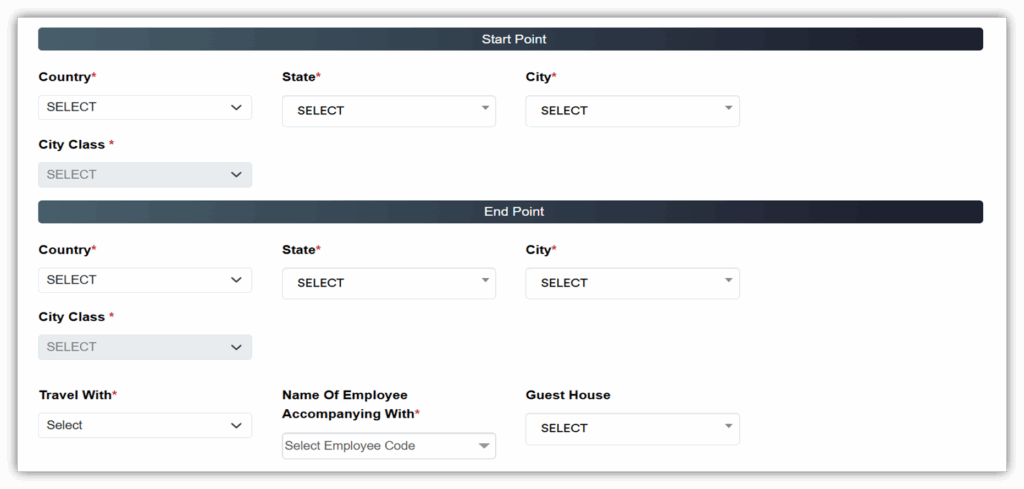
Transfer Parameter

Transfer Request

Travel & Reimbursement

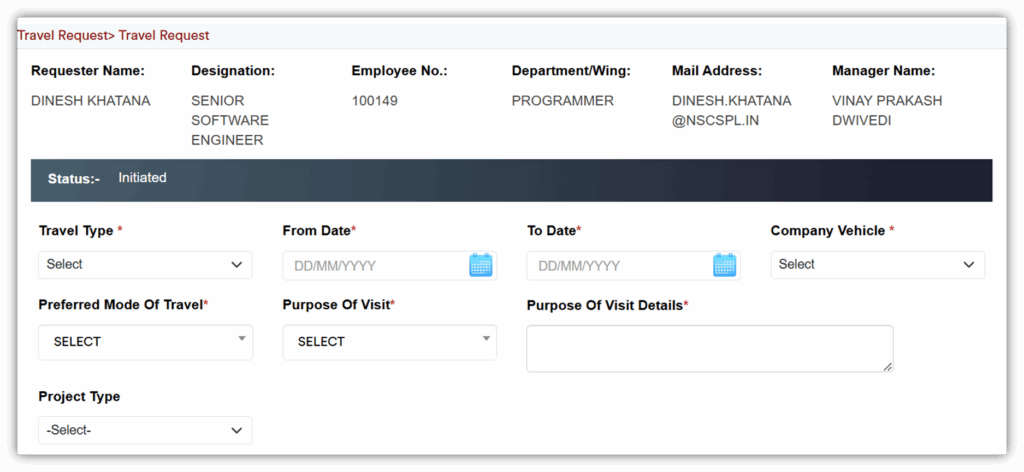
Travel Management

    • Multi-level, multi-department approval workflow for travel requests.

    • Employees can raise travel requests with individual preferences.

    • Support for requests related to ticketing, visa, hotel, cab, and company vehicles.

    • Approved requests are routed to the Travel Desk for booking.

    • Booking confirmations sent to both employee and Travel Desk.

    • Travel advance request workflow with approvals.

    • Alerts and notifications for travel requests and updates.

    • Facility for employees to cancel travel requests.

    • Employees can track the status of their travel requests.

    • Support for travel short/extension requests.

    • Managers can monitor travel status for their team in real time.

    • Room allocation details available per travel request.

Reimbursement Management

  • Multi-level approval workflow for reimbursement claims.

  • Creation and management of various reimbursement heads.

  • Employees can submit reimbursement claims online.

  • Employees can attach soft copies of supporting bills.

  • HR can track reimbursement balance, entitlement, summary, and ledger.

  • Authorized approvers can approve claims online.

  • Workflow maintains records of accepted and rejected claims with auto email notifications.

  • Employee claim history is maintained for reference.

  • Facility to maintain a tour diary.

Claim & Reimbursements

  • Maintenance of expenditure/Reimbursement for different types
  • Expenditure/Reimbursement register
  • Provision to maintain all types of Expenditure/ Reimbursement like Newspaper, Briefcase etc.
  • Ability to maintain Expenditure/ Reimbursement  eligibilities for each type of Expenditure/ Reimbursement depending  on rules  specified  by   the bank.
  • Ability to maintain rules for Expenditure/Reimbursement takes in terms of rules for  availing Expenditure/ Reimbursement, accrual of Expenditure/ Reimbursement, lapsing of Expenditure/ Reimbursement, ceilings for accumulation of Expenditure/ Reimbursement etc.
  • Ability to record actual Expenditure/ Reimbursement.
  • Expenditure/Reimbursement availment/ carry-over processes administration as per the statutes laid down by the government/ bank.
  • Support online application and approval of Expenditure/ Reimbursement viz. Newspaper, Phone Bill, sumptuary etc.

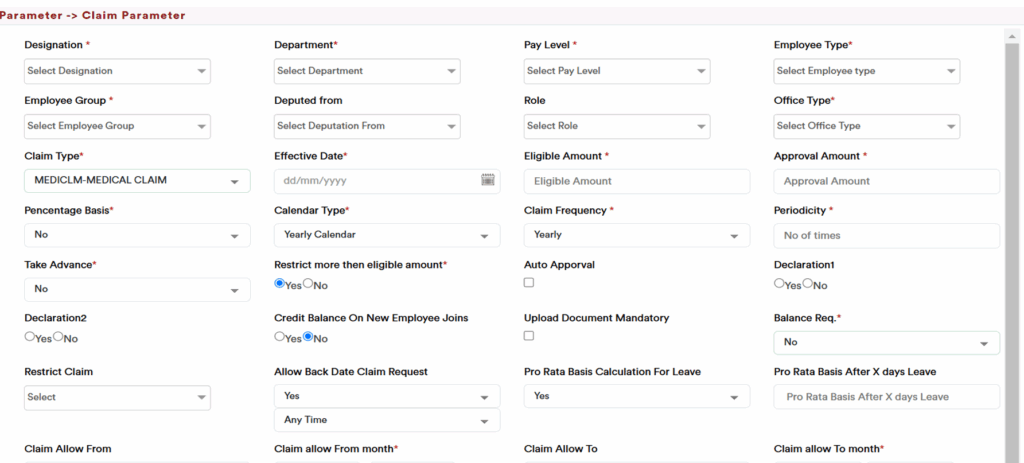
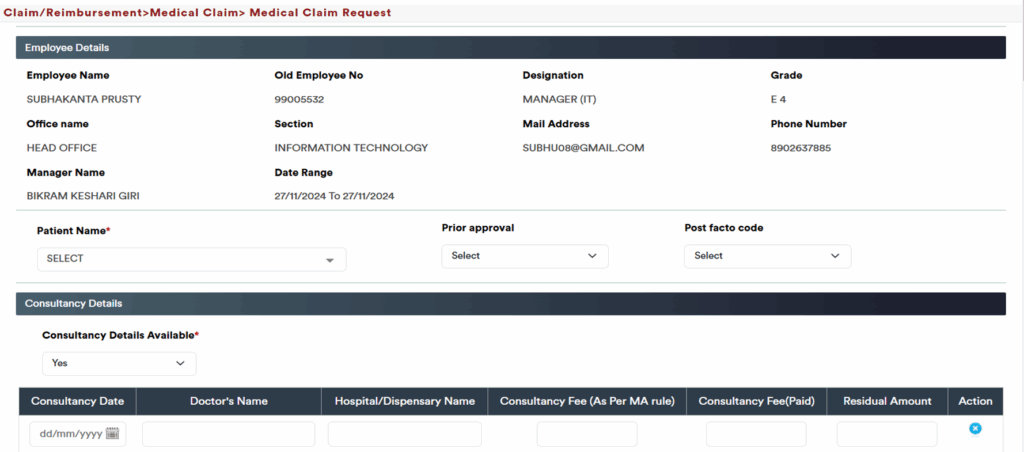
Medical claim

  • Integrated as part of the eHR system for seamless employee reimbursements.

  • Employees can submit medical claims for reimbursement, which are routed through an approval workflow.

  • Approving authority can approve or reject claims, with automated notifications at each stage.

  • Reports can be generated for analysis and audit purposes.

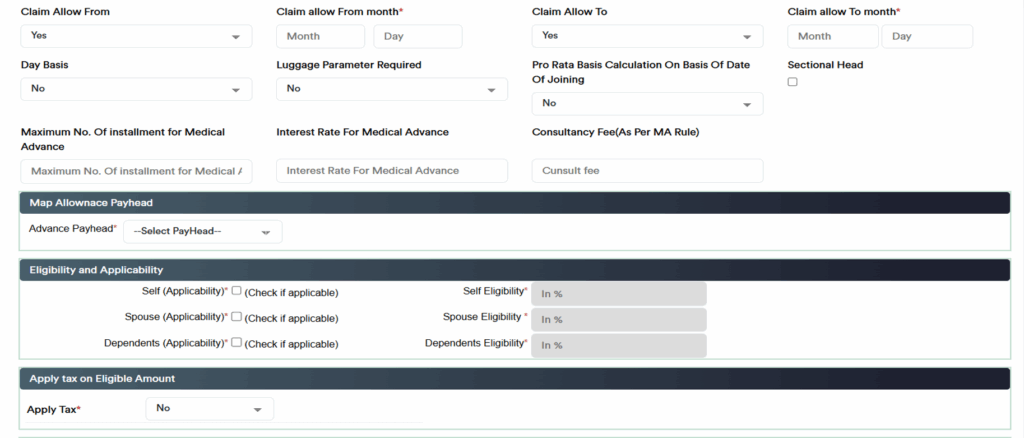
  • Definition and maintenance of medical claim details based on employee scale or other parameters.

  • Hospitalization Claim Register maintains records of all medical aids and hospitalization claims, employee-wise.

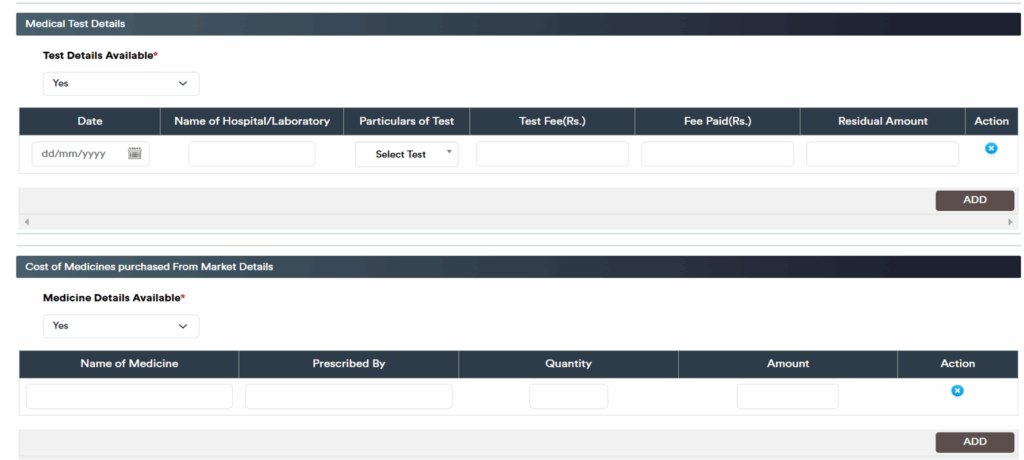
  • Provision to manage various claim types:

    • Medical Aid

    • Hospitalization

    • Consultancy

    • Medical Tests

    • Cost of medicines purchased from the market

    • Travel expenses related to medical treatment

  • Document attachment feature with description for supporting evidence.

  • Support for online application and approval of medical claims.

  • Employees can track the status of their medical claims in real-time.

  • Management of advances taken against medical requests.

  • Support for different claim types:

    • Prior Medical Claim Requests

    • Post-Facto Medical Claim Requests

    • Residual Claim Requests

    • Residual Claim Status tracking

Claim Parameter

Medical Claim Request

Payroll

  • Multiple Payroll Handling: Supports pay grade-wise, CTC, stipend, deputation, and 3rd-party payrolls—managing all HR activities except payroll.

  • Centralized Payroll Processing: Single payroll depository enabling payroll runs and access from any location, supporting both centralized and decentralized operations.

  • Rule-Based Architecture: Built-in rules, tax updates, and country-specific functionalities ensure compliance and adaptability.

  • Flexible Pay Component Management: Configure, add, modify, or delete salary components, including earnings and deductions, with full flexibility.
  • User-Defined Entry Fields: Supports formulas, percentages, or customized calculations for unique requirements.
  • Tax Computation: Differentiates between taxable and non-taxable earnings for accurate income tax calculations.
  • Attendance-Based Calculations: Payroll can be computed based on attendance.

  • Frequency & Period Flexibility: Monthly or yearly payments; ability to define salary head frequency.

  • Advanced Component Computation: Handles calculations for components not appearing in the payslip.

  • No-Code Updates: Make changes to rules, tax updates, and other configurations without programming.

  • Arrears & Retrospective Calculations: Calculate arrears for any period, with separate payslips and bank transfer statements for arrears.

  • Additional Payroll Functions: Includes overtime, gratuity, bonus, ex-gratia, reimbursements (medical, LTA, or user-defined), and supplementary payments.

Salary Reports & Payslips:

  • Monthly salary sheets automatically calculate all income, deductions, and company contributions.

  • Payslips can be viewed, downloaded, or emailed to employees.

  • Reimbursement payslips are separately viewable or emailable.

  • User-defined salary sheets can be generated for custom reporting.

  • Bank transfer lists (TTUM files) and direct electronic bank transfer files with covering letters for banks.

  • Year-to-date (YTD) salary sheets and employee-wise summaries.

  • Separate payslips can be generated for arrears, medical reimbursements, LTA, and other components.

Statutory Compliance & PF Reports:

  • User-defined PF deduction rates for employer and employee contributions.

  • Automatic bifurcation of EPF and EPS.

  • PF applicability checks at the employee level with options to limit maximum salary for PF deduction.

  • Generation of Form 5, 10, 12A, 3A, 6A, challans, and reconciliation statements.

ESIC Reporting:

  • User-defined ESIC rates for employer and employee deductions.

  • ESIC applicability checks at the employee level.

  • Generation of ESIC registers, Form 5, Form 6, and challans.

Payroll Masters

  • Allowances Master: Define salary allowances provided to employees.

  • Deductions Master: Define salary deduction heads.

  • Compensatory Allowances Master: Define compensatory allowance heads for salary components.

  • Advance Deductions Master: Define deduction heads for recovery in salary.

  • Benefit Scheme Master: Maintain benefit scheme names and details.

Payroll Parameters

  • Allowances & Deductions Parameters: Set conditions or expressions to calculate pay head amounts during salary generation.

  • Pay Head Parameters: Define calculation order of pay heads in salary processing.

  • Pay Generation Parameters: Configure common salary generation settings such as salary days calculation (month days or custom days).

  • Pay Scale Parameters: Set fitment levels grade-wise.

  • Pay Head Account: Link GL account numbers with pay heads.

  • Certification Parameters: Define certification rules for increments.

  • DA Percentage: Configure DA percentage for salary calculations.

Payroll Operations

Payroll Management:

  • Pay Generation: Generate and calculate salaries with automatic income tax computation in one click.

  • Pay Delete: Remove unapproved or unpaid salaries.

  • Pay Authorization: Authorize generated salaries based on access rights.

  • Pay Payment: Process payment for authorized salaries.

Arrear Management:

  • Arrear Generation: Generate and calculate arrears in one click.

  • Arrear Delete: Remove unapproved or unpaid arrears.

  • Arrear Authorization: Authorize generated arrears as per access rights.

  • Pay Arrear: Process payment for authorized arrears.

Recovery Management:

  • Recovery Generation: Generate and calculate recoveries in one click.

  • Recovery Delete: Remove unapproved or unpaid recoveries.

  • Recovery Authorization: Authorize generated recoveries as per access rights.

  • Pay Recovery: Process payment for authorized recoveries.

Reports

  • Generate monthly and user-defined salary sheets.

  • Generate payment files for banks (TTUM format).

  • Generate statutory forms and compliance reports.

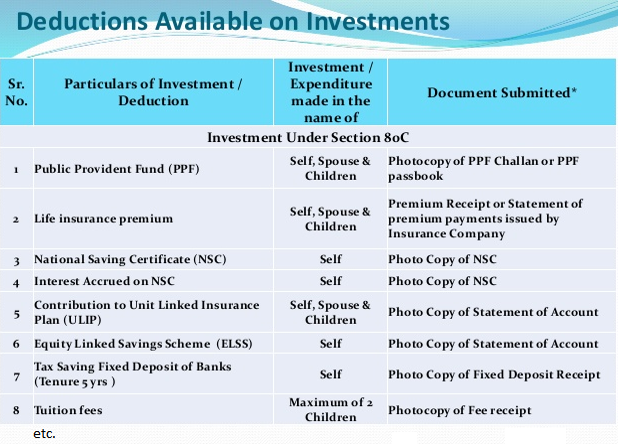
Income tax

  • Flexible Tax Configuration: Define income tax rates as per slabs and manage updates effortlessly.

  • Investment Declaration: Streamline employee investment declarations for accurate tax computation.

  • Estimate vs. Actual: Compare projected and actual tax calculations.

  • Comprehensive Tax Calculation: Compute income tax organization-wise or employee-wise, considering salary structure, investments, and exemptions.

  • Automatic Estimation: Income tax automatically estimated based on employee CTC.

  • Statutory Reports: View, download, or print all statutory income tax reports.

  • TDS Automation: Automatic TDS calculation based on projections with options to deduct projected TDS from monthly salary.

  • e-TDS Compliance: Generate quarterly e-TDS returns in NSDL format.

  • Digital Reporting: Income tax projections can be emailed in PDF format.

  • Full & Final Settlement:

    • Calculate final salary for exiting employees based on resignation (current or previous month) as per defined rules.

    • Automatically include outstanding loans, notice pay, leave encashment, gratuity, and recover all loans and income tax.

    • Generate a comprehensive Full & Final Settlement sheet.

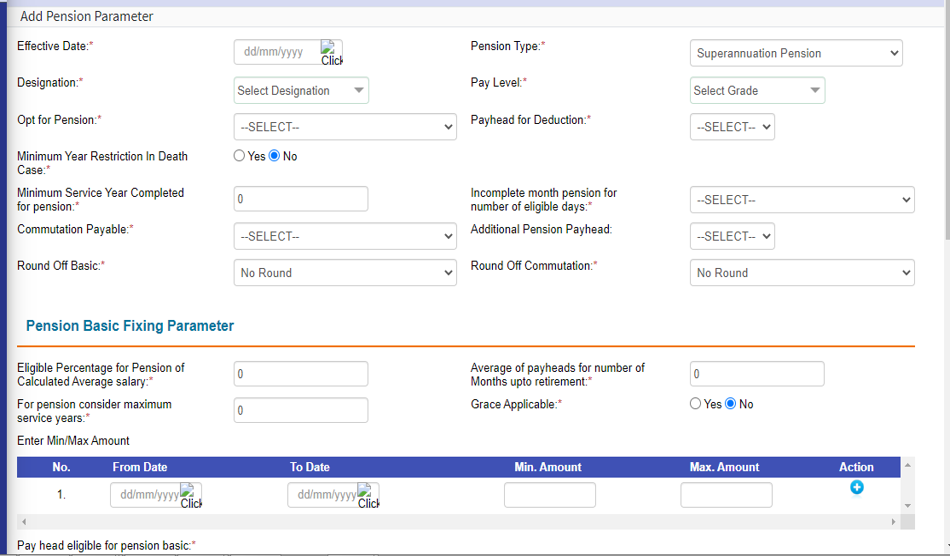
Pension

  • Workflow Automation: Facility to automate the employee pension process with configurable rules.

  • Pension Calculation & Commutation:

    • Calculate and fix pension commutation after retirement.
    • Fix pension basic and define DA% for pension computation.

    • Process commutation payments for employees whose commutation was not paid at the time of pension fixation.

  • Sanction & Documentation:

    • Calculate pension, commutation, and prepare sanction notes.

    • Generate pension certificates and family pension sanction letters.

    • Maintain nominee details for family pension processing.

  • Tax & Compliance:

    • Compute income tax on pension, deductions, and generate Form 16.

    • Generate detailed pension slips.

  • Controls & Adjustments:

    • Stop or hold pension due to non-submission of documents.

    • Manage commutation portion after specific years.

    • Stop/hold pension for specific pensioners when required.

Increment

  • Comprehensive Module: Efficiently manage all aspects of employee promotions and salary increments.

  • Career Path Management: Create and maintain standard career paths for employees.

  • Increment Entry:

    • View the list of pending salary increments for the selected month.

    • Display employee details including employee number, name, date of last increment, current basic amount, due date of next increment, and expected date of the subsequent increment.
    • Modify the due date of the next increment as required.
  • Increment AGI Date: View and update employee-wise Adjusted Gross Income (AGI) dates for increments.

  • Manual Increment Entry: Enter increments manually with increase percentage, payable amount, and effective date.

  • Increment Reversal: Revert the last increment entry if needed.

  • Appraisal-Linked Increment: Process increments automatically based on appraisal ratings.

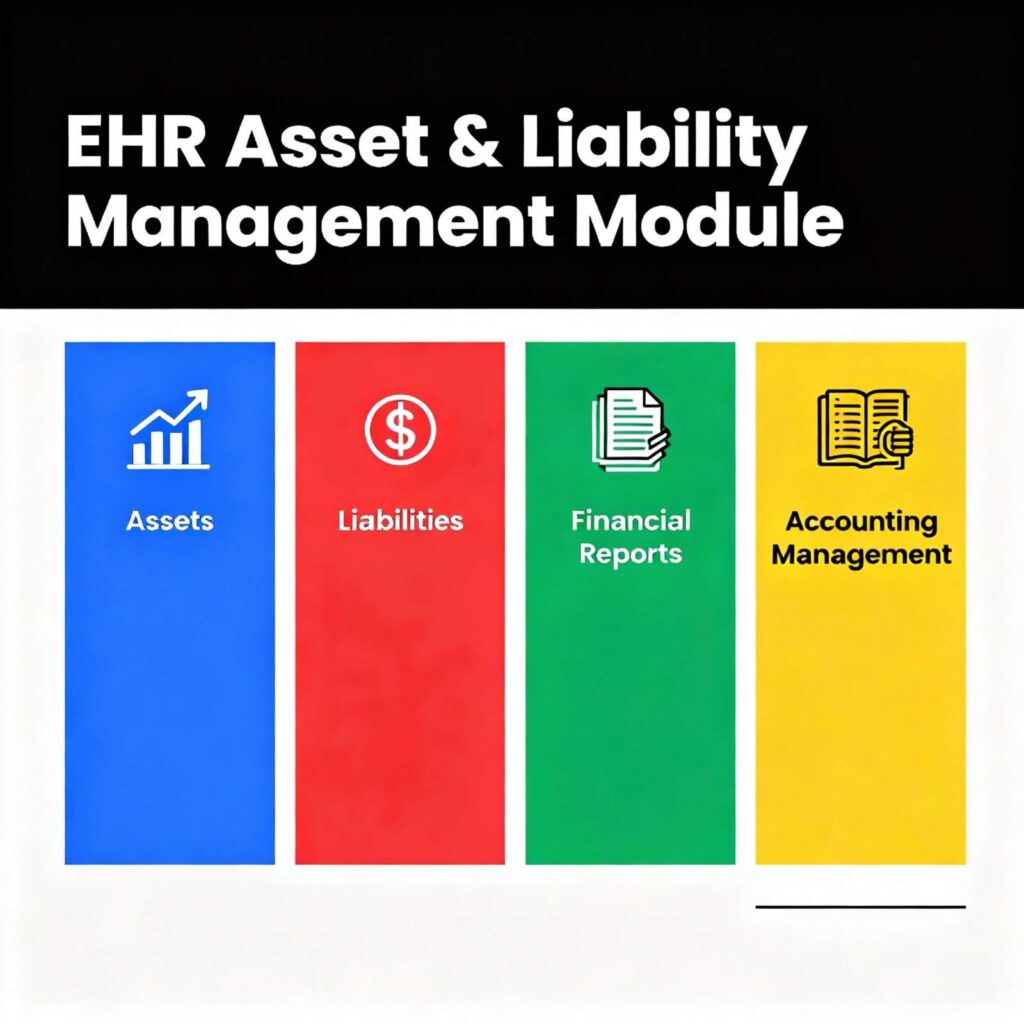
Assets & liabilities

  • Document Creation: Generate Assets & Liabilities documents for employees as per bank-provided formats, including assets, liabilities, and other relevant forms.

  • Parameter Definition: Define descriptions for each asset and liability parameter.

  • Data Capture & Confirmation: Enter, save, and confirm employee details; submit finalized data.

  • Printing & Reporting: Print submitted Assets & Liabilities data for records.

  • Period Management: Define the reporting period for which Assets & Liabilities details are maintained.

  • Historical Data Maintenance: Maintain and view history of previously submitted Assets & Liabilities information.

  • Non-Submission Alerts: Issue memo letters, emails, or workflow notifications to employees in case of non-submission.

  • Data Review: View earlier details submitted by employees for reference or verification.

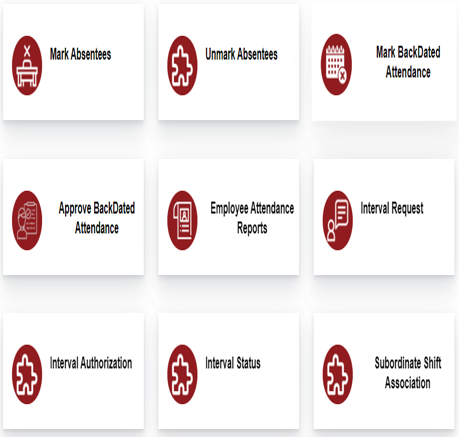
Attendance

  • Real-Time Biometric Integration: Seamlessly link attendance data with biometric systems for accurate tracking.

  • Shift Management:

    • Maintain flexible shift policies with a comprehensive shift master.

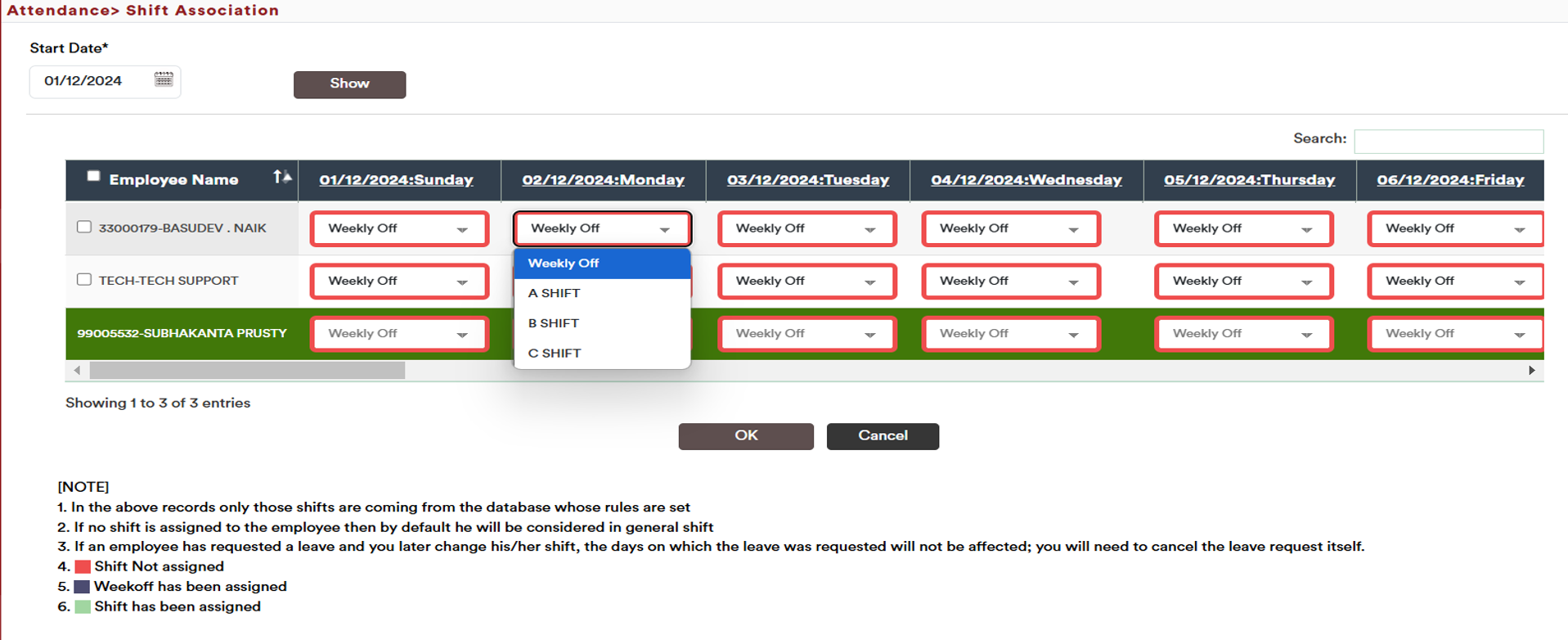
    • Auto-generate shifts and rosters.

    • Import shifts and rosters via Excel.

    • Manage shift changes through configurable workflows.

  • Alerts & Notifications: Automatic email alerts for missed attendance, exceptions, or short hours.

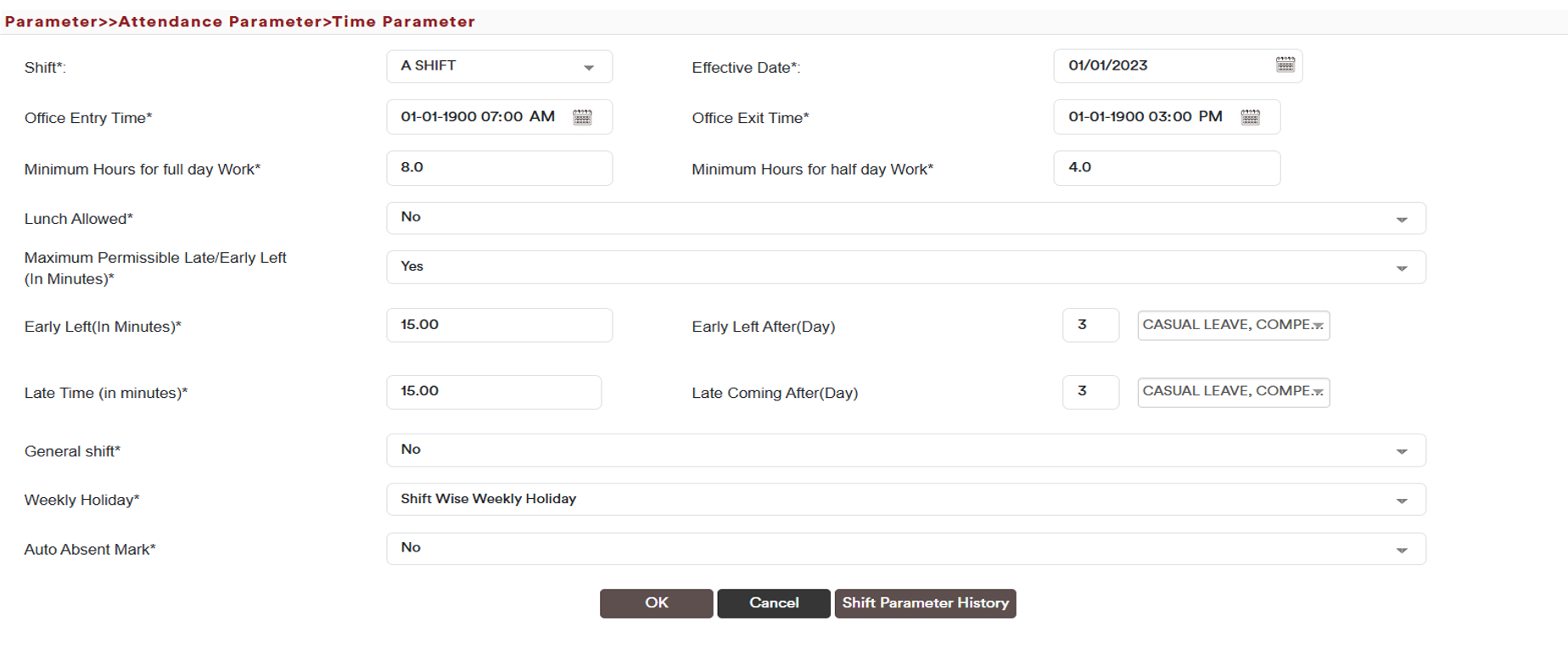
  • Weekly Off & Holidays: Define fixed or flexible weekly offs and maintain location-wise holiday master.

  • Attendance Exceptions: Manage late arrivals, early departures, and other deviations.

  • Data Management & Locking: Auto cutoff date for attendance and option for manual locking.

  • Reporting: Standard attendance reports available in Excel, PDF, and Word formats.

  • Payroll Integration: Attendance auto-captured for payroll processing, including overtime, attendance arrears, and short hours.

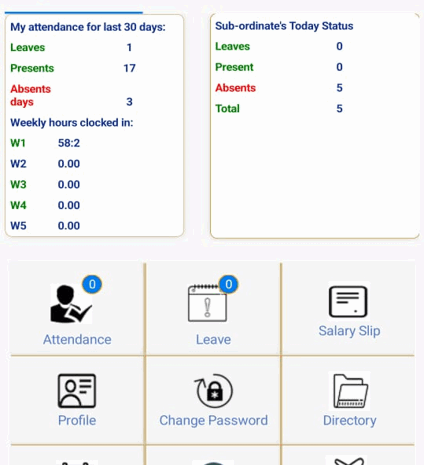
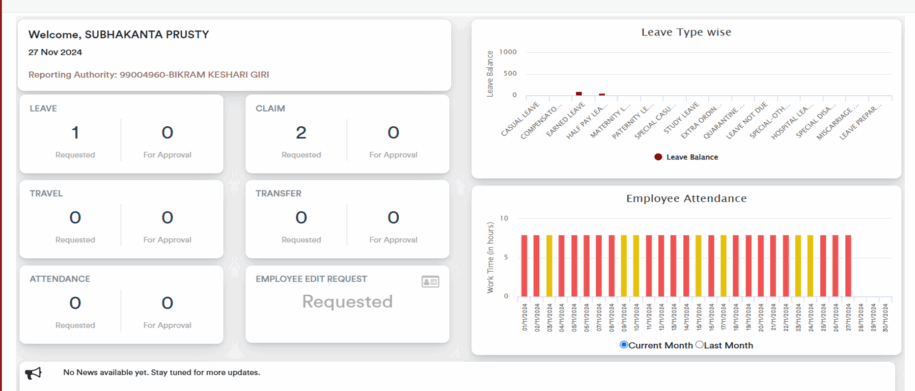
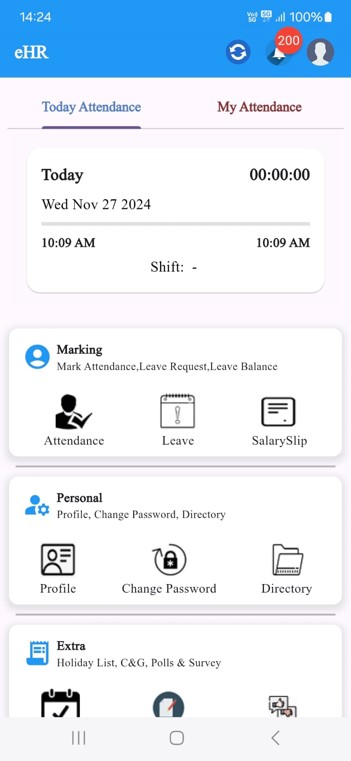
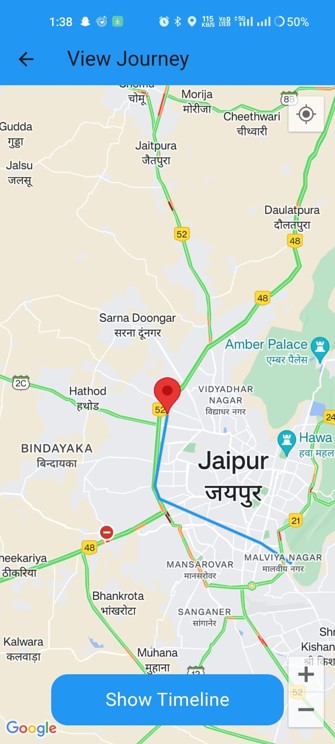
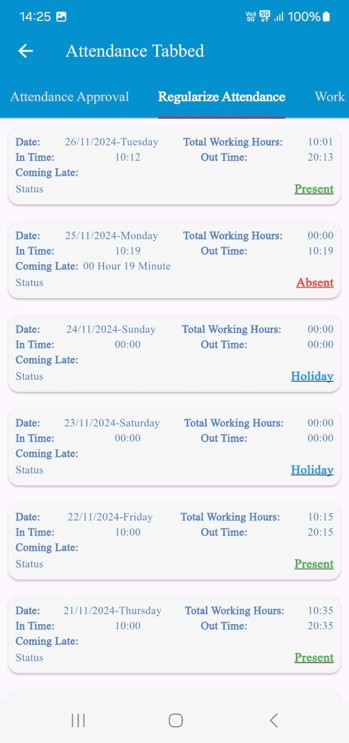
  • Employee Self-Service: Employees can view real-time attendance details via ESS portal and mobile app.

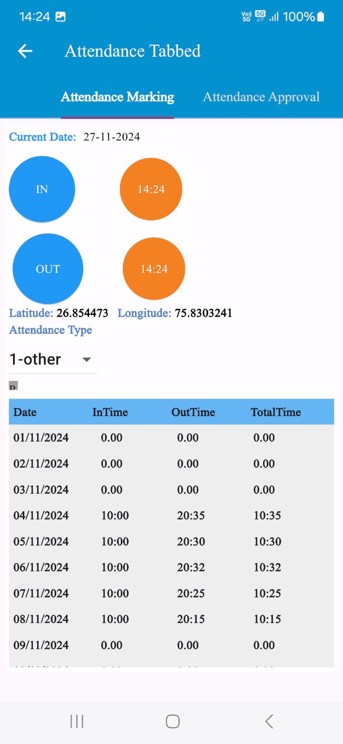
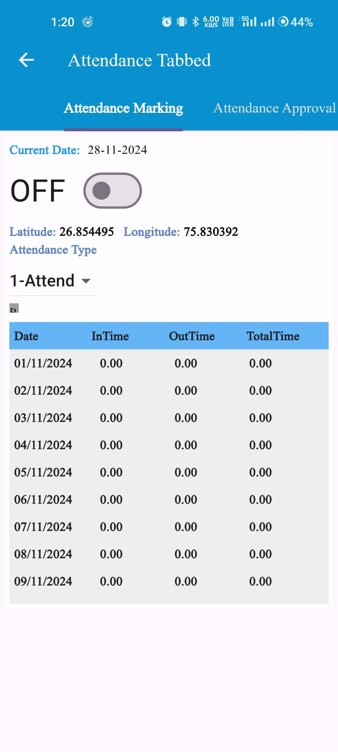
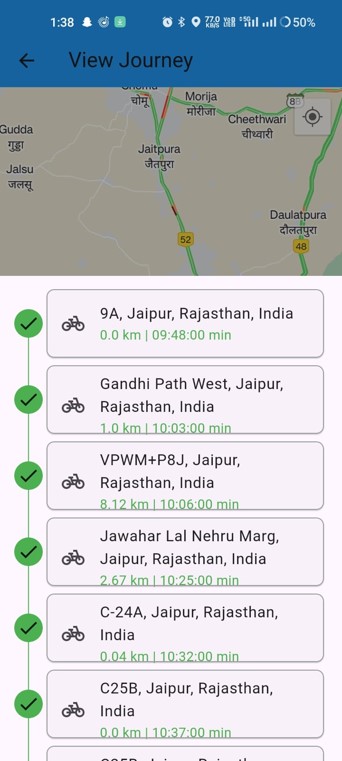
  • Advanced Features: Geofencing and real-time photo capture via mobile app.

  • Salary Calculation: Compute salary based on total hours worked or first-in/last-out timings.

Attendance Shift Parameter

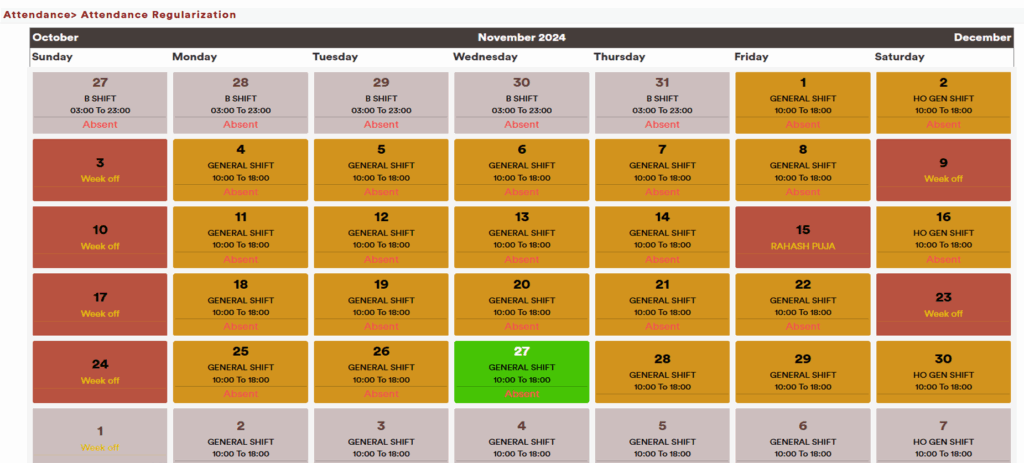
ESS Portal Attendance

ESS Portal Attendance
Attendance Shift Association

Ess Portal Dashboard

Mobile Application

  • Personal Profile: View and manage personal information anytime, anywhere.

  • Attendance Management: Real-time access to attendance records, shift details, and exceptions.

  • Leave Management: Apply for leave, track leave balances, and view leave history.

  • Tour Management: Submit and track official tour requests and approvals.

  • Claims Management: Submit, track, and manage reimbursement and expense claims.

Mobile Attendance Geolocation

  • Personal Profile: View and manage personal information anytime, anywhere.

  • Attendance Management: Real-time attendance tracking with geolocation for accurate location-based verification.

  • Leave Management: Apply for leave, track leave balances, and view leave history.

  • Tour Management: Submit and track official tour requests and approvals.

  • Claims Management: Submit, track, and manage reimbursement and expense claims.

Mobile Application

Analytics Dashboard

Employee Engagement

  • Work Anniversaries & Birthdays: Automated recognition and announcements.

  • Mood Tracker: Capture employee sentiment in real-time.

  • Short Surveys & Engagement Surveys: Conduct quick polls and detailed engagement surveys.

  • Announcements / E-Notice Boards: Share company updates, notices, and announcements digitally.

  • Reports & Analytics: Generate insights and analytics from surveys and engagement activities.

  • Monthly Engagement Highlights: Summarize key engagement initiatives and results.

  • Well-being Programs: Schedule wellness sessions and videos, with automated reminders to employees.

  • Mobile App Integration: Access all engagement and wellness features via the mobile application, seamlessly integrated with relevant HR modules.

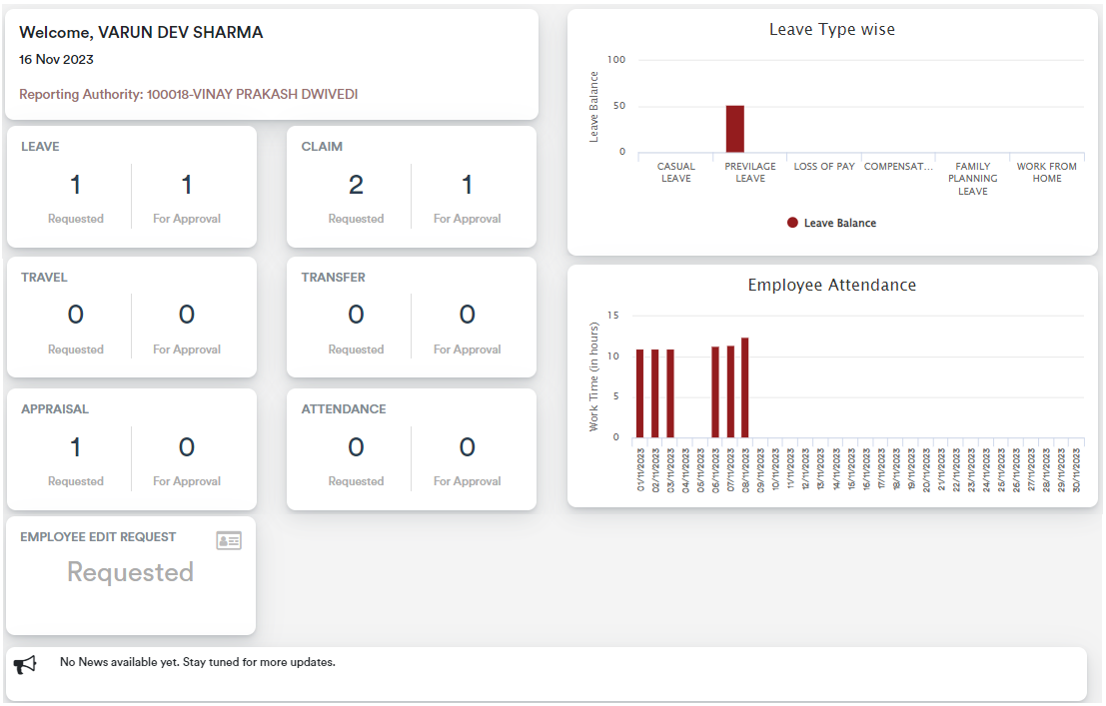
Employee self services portal (ESS)- Dashboard

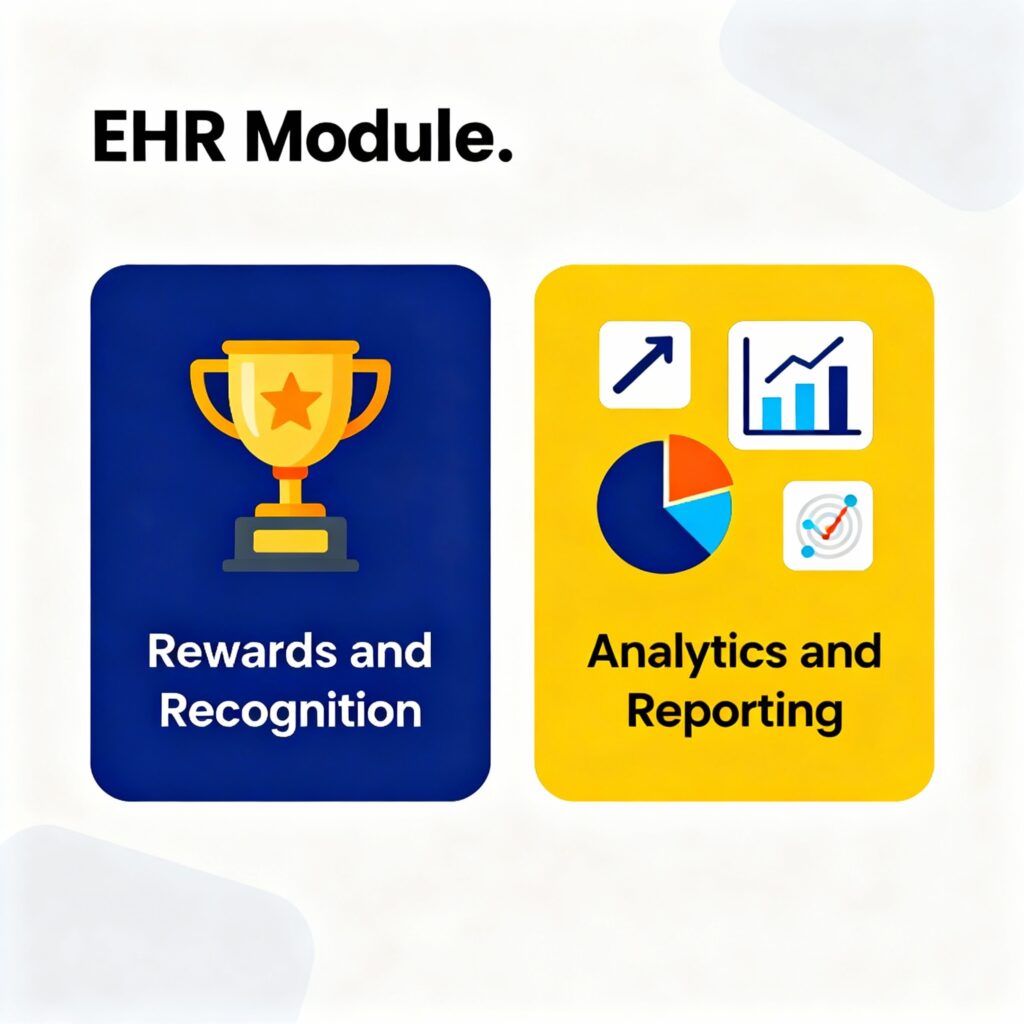
Rewards and Recognition, Analytics and Reporting

  • Workflow Management: Define workflows for rewards and recognition to ensure structured approval and distribution.

  • Personalized Experience: Configure badges, banners, and certificates for a customized employee experience.

  • Budget & Limit Control: Complete control and visibility over reward budgets, with flexible limits.

  • Unlimited Awards: Add an unlimited number of rewards and recognitions.

  • KPI-Based Rewards: Link rewards to Key Performance Indicators for performance-driven recognition.
  • Visibility & Dashboard: Transparent view of all rewards, recognitions, and appreciations through a centralized dashboard.
  • Content Management: Easily upload badges, certificates, and other recognition assets.
  • Redemption Options: Provide voucher or reward redemption options.
  • Integrated Workflows: Link rewards with other modules for special workflows such as additional leave or cash redemption.

  • Analytics & Reporting: Deep analytics provide insights into adoption, equity, and employee engagement.

  • Peer-to-Peer Recognition: Enable employees to recognize and appreciate peers via badges and certificates.

  • Dedicated Platform: Maintain a separate platform for rewards, recognition, and appreciations for easy management and visibility.

Employee Separation (Exit)

  • Online Exit Request: Employees can submit resignation or exit requests online.

  • Approval Workflow: Immediate authority can approve or reject requests; functional heads and reporting layers can review, add comments, and process the request.

  • Departmental Approval: Exit requests are routed to concerned department heads for clearance.

  • Functional Overview: Functional heads have visibility of all exits, including retirements, contract expiries, and deputation completions.

  • Multiple Department Clearance: Ensure clearance from multiple departments as part of the exit process.

  • Notifications & Alerts: Automatic email and dashboard notifications to respective authorities for action.

  • HR Alerts: Auto alerts to HR for retirements, deputation end dates, and other exit triggers as per defined rules.

  • Payroll Integration: Automatic transfer of exit data to payroll for full & final settlement calculation.

  • NOC & Handover Workflow: Configurable workflows for NOC formalities, asset handover, knowledge transfer, and exit interviews.

Disciplinary action management Investigation/Enquiries

  • Charge Sheet Definition: Ability to define and issue charge sheets for disciplinary actions.

  • Enquiry Management: Conduct enquiries against charges with full documentation.

  • Decision Making: Authorities can take decisions based on enquiry findings.

  • Penalty Definition: Define and apply penalties such as:

    • Censure with remarks

    • Withholding or stopping increments

    • Holding of promotions

    • Recovery from emoluments

    • Reduction in time scale or grade/post

    • Compulsory retirement

    • Removal from service

    • Dismissal, including disqualification for future employment

  • Appeal Process: Employees can file appeals against decisions through the eHR system.

  • Reporting: Generate comprehensive reports on disciplinary actions, penalties, and appeals.

Other Features

  • Helpdesk Management: Assign and track issues reported by employees to the HR team for resolution.

  • Survey & Feedback: Conduct surveys and collect feedback based on questionnaires set by the admin.

  • Maker/Checker Workflow:

    • All activities follow a maker/checker process.

    • Makers can create entries; checkers can authorize but cannot edit maker entries.

    • Checkers can cancel created entries.

    • Once authorized, activities cannot be deleted.

  • API Integration: Provide API-based interfaces for integration with external systems.

  • Alerts & Notifications: Email and SMS alerts for scheduled activities, tasks, and notifications.

  • User-Defined Access Rights: Configure access rights based on roles and responsibilities.

  • Exceptional Transaction Authorization: All exceptional transactions require proper authorization.

Reporting

  • Customizable Reports: Generate HR reports based on multiple metrics and selectable criteria.

  • Flexible Filters: Define reports by selecting various fields and filters as required.

  • Access Control: Apply user-specific access rights to control report visibility for authorized personnel and senior management.

  • Export & Printing: Save, download, and print reports in multiple formats.

  • Employee-Specific Reports: Provide personal reports for employees, including:

    • Salary payslips

    • Provident Fund reports

    • Loan reports

  • Graphical Dashboard: Display reports and analytics visually on the HR dashboard for quick insights.

Integration

  • Core Banking Integration: Seamless integration with SAP, Infosys, and TCS Core Banking systems via APIs or TTUM files for payroll and financial transactions.

  • Third-Party Integration: Support for integration with other third-party tools and systems to ensure data consistency and streamlined workflows.

  • Biometric & Attendance Integration

    • Accurate & Seamless Integration: Connect with biometric devices, face recognition systems, and UIDAI-enabled devices.

    • Real-Time Tracking: Capture and validate employee attendance in real-time.

    • Verification & Validation: Ensure accurate employee identification and attendance verification.

Additional features available out-of-the-box

  • Budgeting: Manage the complete workflow from request to approval to allocation of budgets.

  • Manpower Planning: Track allocated positions, actual staffing, and identify gaps.

  • Recruitment Management: End-to-end recruitment from job description creation to onboarding.

  • Organization & Position Management: Maintain organizational structure and manage positions efficiently.

  • Appraisal & Performance Management: Configure appraisal templates and manage performance reviews.

  • Employee Loan Management: Track and manage employee loans and recoveries.

  • Communication Management: Send SMS, email, and letters to employees seamlessly.

  • Employee Engagement: Conduct polls, surveys, and manage company blogs for collaboration.

  • Helpdesk & Ticketing System:

    • Raise tickets or requests for various HR activities.

    • Assign tickets and manage escalations effectively.

  • Digital Engagement Tools:

    • PromptMe notifications for updates and reminders.

    • WhatsApp integration for instant communication.

    • Nudge with contextual audio and video walkthroughs.

    • Contact Centre solution with system integration for employee support.

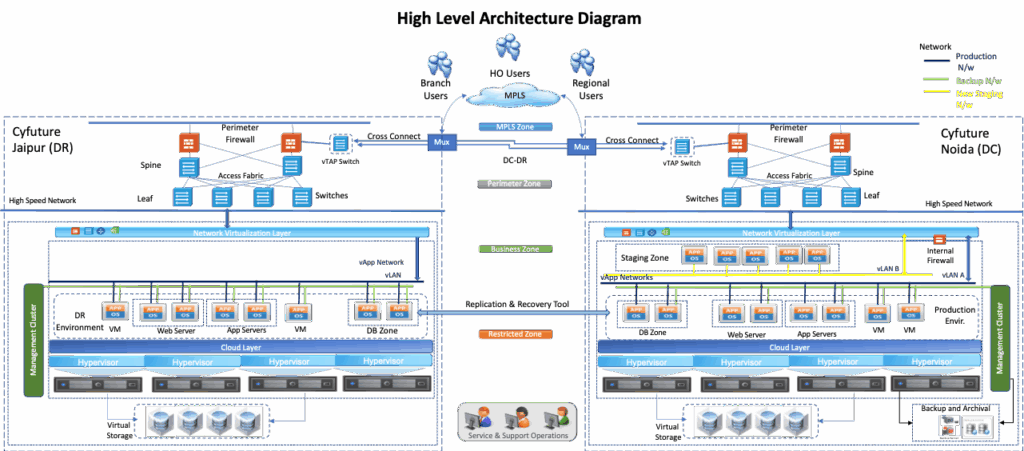
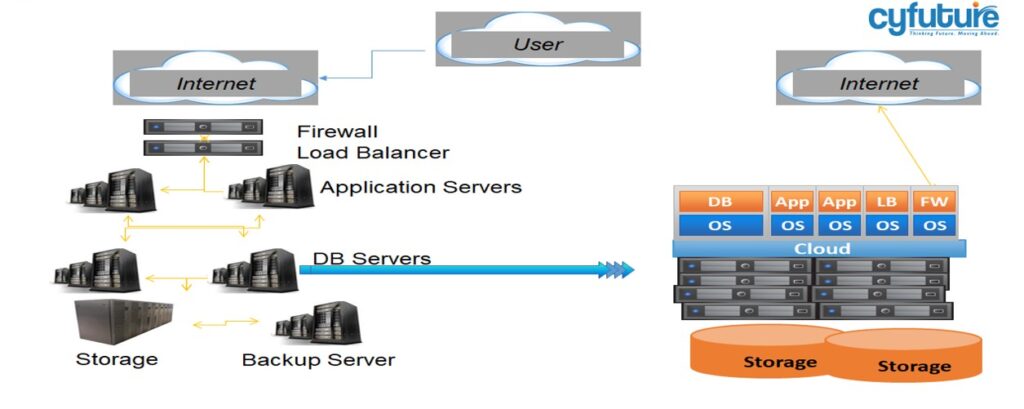
Cloud :- High Level Architecture Diagram

Cloud :- Cyfuture Cloud

  • Industry-Leading Virtualization: Deploy virtual servers using VMware’s robust infrastructure platform.

  • Operating System Support: Compatible with RedHat Linux, Microsoft Windows, CentOS, SUSE, and Ubuntu.

  • Granular Server Configuration: Customize virtual servers with specific numbers of vCPUs, RAM, and local storage per server.

  • Flexible Management:

    • Manage servers through the administrative user interface (UI) or via REST-based API.

    • License management with automated patch updates through Red Hat Network and Microsoft Windows Update Services.

  • Secure Networking:

    • Each server is assigned a static private IP accessible only via VPN.

    • Public IP addresses assigned only as needed.

  • Role-Based Administration: Control access for administrators managing the servers.

  • Server Cloning & Customization: Clone virtual servers to create client-specific images for rapid deployment.

  • Import/Export Capability: Import and export server images to transfer virtual machines between client infrastructure and CYFUTURE cloud environment.

Cloud Security

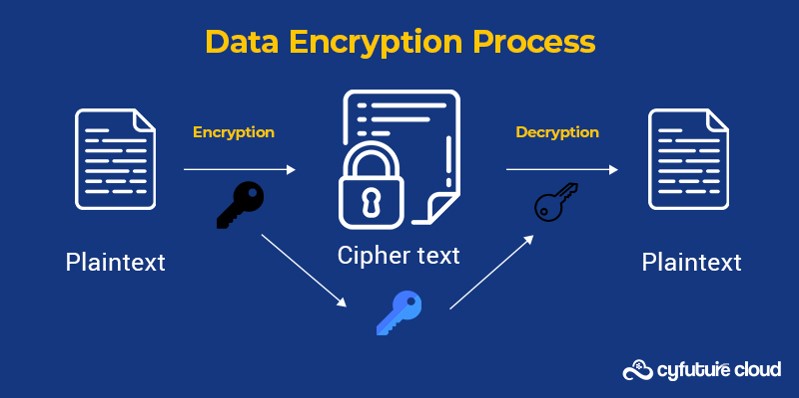
  • Advanced Data Encryption: Protect data at rest and in transit using AES-256 encryption, ensuring maximum confidentiality and security.

  • Access Controls & Authentication: Implement robust access control mechanisms and multi-layer authentication to prevent unauthorized access.

  • Backup & Disaster Recovery: Comprehensive backup solutions and disaster recovery plans to ensure data integrity and enable rapid restoration.

  • High-Level Encryption Options: Provides granular control and multiple encryption alternatives for critical services, ensuring sensitive data remains secure even across complex cloud environments.

  • Data Integrity Assurance: Continuous monitoring and validation mechanisms maintain the integrity and availability of data.

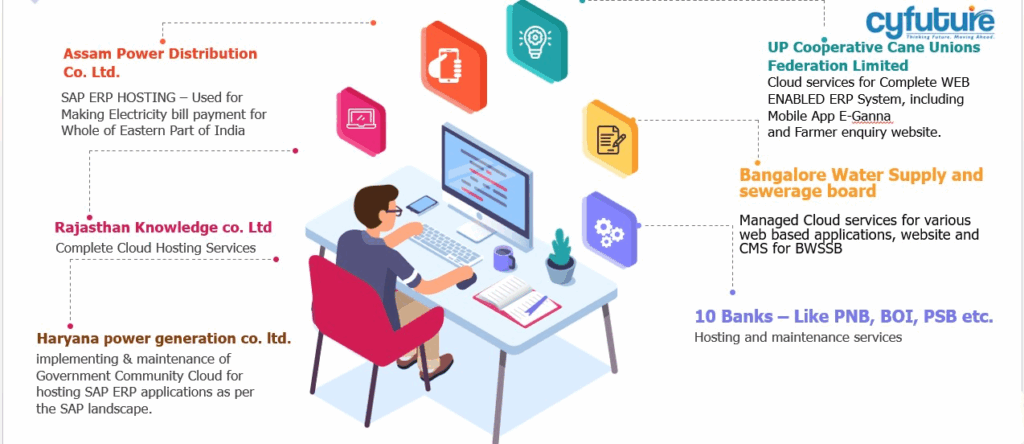
Customer Use Cases

Disaster Recovery Management

Technology Stack

Looking for a solid software development partner?

Find out how we can help you

Call Now Button